
It’s been hard to ignore the uptick in attacks against the npm ecosystem of late. Campaigns to steal maintainers’ credentials and effectively poison the software supply chain—along with countless downstream applications and users—made headlines all summer and continue into the fall.
In July, five specific packages within the prettier ecosystem in the npm package repository were compromised, each harboring malicious dynamic link libraries (DLLs). Shortly after, the is package, a utility for type-checking, was compromised after the maintainer was removed from his account following a phishing attack.
In early September, another spear phishing attack compromised 18 popular packages—including debug and chalk—to spread malware that injected itself into browser functions like fetch and XMLHttpRequest to manipulate crypto and web3 activities and ultimately steal cryptocurrency.
While npm package compromises aren’t new, the recent spike in incidents is a reminder of ongoing threats targeting software supply chains, particularly within widely used open-source ecosystems like Node.js.
We’ll delve into the mechanisms behind these npm package compromises, exploring how adversaries gain access, how they leverage that access to inject malicious code, and critically, what steps both developers and users can take to mitigate these risks and respond effectively.
Understanding npm: The foundation of Node.js
Before we dig into the compromise methods, let’s establish a common understanding of npm. For those unfamiliar, npm stands for Node Package Manager, and it is the default package manager for Node.js. In essence, npm packages are modular Node.js libraries—self-contained units of code that developers can easily incorporate into their projects.
If you’re familiar with Python’s PyPI (Python Package Index) or Ruby’s RubyGems, an npm package serves a similar purpose. It’s a pluggable library, often with its own set of dependencies, designed to extend functionality and streamline development. This modularity is a tremendous asset, enabling rapid application building and code reuse.
Yet it also means that a single compromised package can ripple through countless projects that depend on it, creating a wide-reaching vulnerability across the software landscape.
The attack vector: Compromising developer accounts
At the heart of most npm package compromises lies the successful takeover of a legitimate developer’s account. An npm account, registered through npmjs.org, is just like any other online identity: it has a username, password, an associated email address, and often, two-factor authentication (2FA). However, because these accounts control packages inside the npm registry trusted by millions of users, they carry an elevated risk profile. Adversaries generally use two methods to seize control of these critical developer identities:
Compromising developer credentials through phishing and stealers
The most prevalent method involves tricking developers into divulging their login credentials. This is typically achieved through phishing. In the recent eslint-config-prettier, eslint-plugin-prettier, and synckit compromises, the adversaries sent a highly convincing phishing email directly to the developer’s email address linked to their npm account. The email was designed to mimic an official npmjs.org communication, complete with branding.
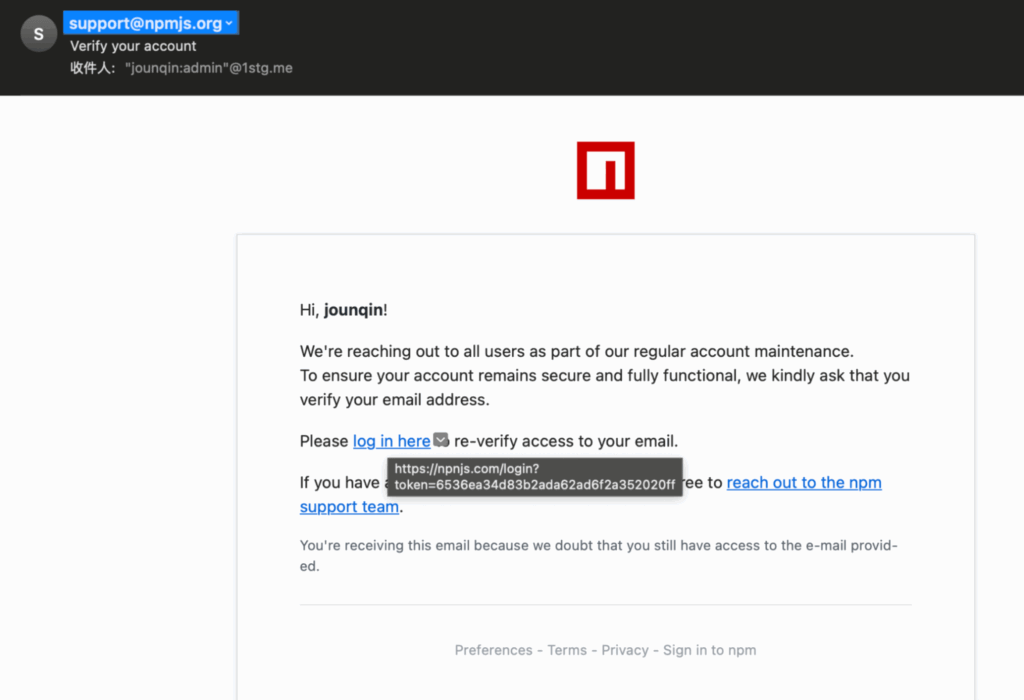
In these instances, the malicious intent was hidden in a subtle yet crucial detail: a typosquatted link. In the prettier package compromise, affecting eslint-config-prettier, eslint-plugin-prettier, and synckit, instead of directing the user to npmjs.com/login, the link led to npnjs[.]com.login. It’s a small difference, but just enough to be dangerous.
The chalk and debug compromises meanwhile tricked the package author into thinking that their two-factor authentication (2FA) needed to be updated but the email came from support [at] npmjs [dot] help, not npmjs.com. These minor typos were enough to divert the developers to a fake login page, where their credentials were harvested by the adversary.
Beyond phishing, developer credentials can also be acquired from stealer logs. These are collections of stolen data, often purchased on the dark web, compiled from systems infected with information-stealing malware. Such malware can scrape cached credentials, browser sessions, and even environment variables containing sensitive tokens, providing adversaries with direct access to accounts or the means to generate new tokens.
Taking over expired domains for email accounts
A more sophisticated, though less common method involves exploiting lapsed domain registrations. Many developers use custom email addresses for their npm accounts. If a developer’s custom domain expires and they fail to renew it, an adversary can register that domain. Once they control the domain, they can set up an email address identical to the one linked to the old npm account. With this email access, the adversary can then initiate a password reset for the npm account, effectively taking it over. This highlights how an seemingly unrelated lapse in domain management can lead directly to a software supply chain compromise.
The Achilles heel of misconfigured 2FA
Even when 2FA is enabled, it’s not a silver bullet. npm offers granular 2FA settings, which can paradoxically create vulnerabilities if not correctly configured. Developers can set 2FA for:
- Authorization and all write actions: This is the most secure setting, requiring a 2FA code for logging in and for critical actions like publishing, unpublishing, or deprecating packages.
- Authorization only: This allows users to log in with 2FA, but bypasses it for write actions. A developer might choose this for convenience, especially if they integrate with continuous integration/continuous development (CI/CD) pipelines, but it leaves a critical window open for adversaries who have stolen credentials and 2FA potentially disabled for write actions.
- Per-package settings: NPM also allows developers to configure 2FA on a per-package basis. This means a developer might have strong 2FA for their account, but explicitly disable it for a specific package , or allow tokens that don’t require interactive 2FA. This flexibility, intended for CI/CD automation, can be easily misconfigured or overlooked, creating a “don’t require” loophole that adversaries readily exploit. A developer might believe they are fully protected by 2FA, but if it’s not enforced for publishing packages with the
npm publishcommand, that sense of security is false.
Publishing packages: The illusion of source control
Once an adversary has access to a developer’s npm account, publishing malicious packages is surprisingly straightforward. It typically involves cloning a repository, adding malicious code, and executing a simple npm publish command. However, a critical misconception can add confusion here: the relationship between a package’s GitHub repository and its content on the npm registry.
The GitHub repo vs. npm package disconnect
Many developers and security professionals instinctively check a package’s GitHub repository to verify its contents and history. This is where a dangerous assumption lies.
There is no obligation or guarantee that the contents of a package’s GitHub repository completely match the contents of any version published to the npm package registry.
Consider the eslint-config-prettier compromise. The GitHub repository showed the last legitimate commit on May 8, 2025. Yet, on July 18 new, malicious versions of the package were published to npm. The adversary never touched the GitHub repository. Instead, they likely gained access to the developer’s npm publishing token or credentials, cloned the legitimate repo locally, injected their malicious code, and then published directly from their local machine. This bypasses GitHub, leaving no trace in the public repository’s commit history.

This means that relying solely on a package’s GitHub repo to verify its code content is insufficient. To truly understand what code is in an npm package version, you must use the npm registry itself. The npmjs.org website provides a “code” tab on each package’s page—similar to the PyPI code-inspector—which allows you to browse the exact contents of the package as it was published. This is the only reliable source for inspecting the actual package code outside of downloading the package contents and exploring it.
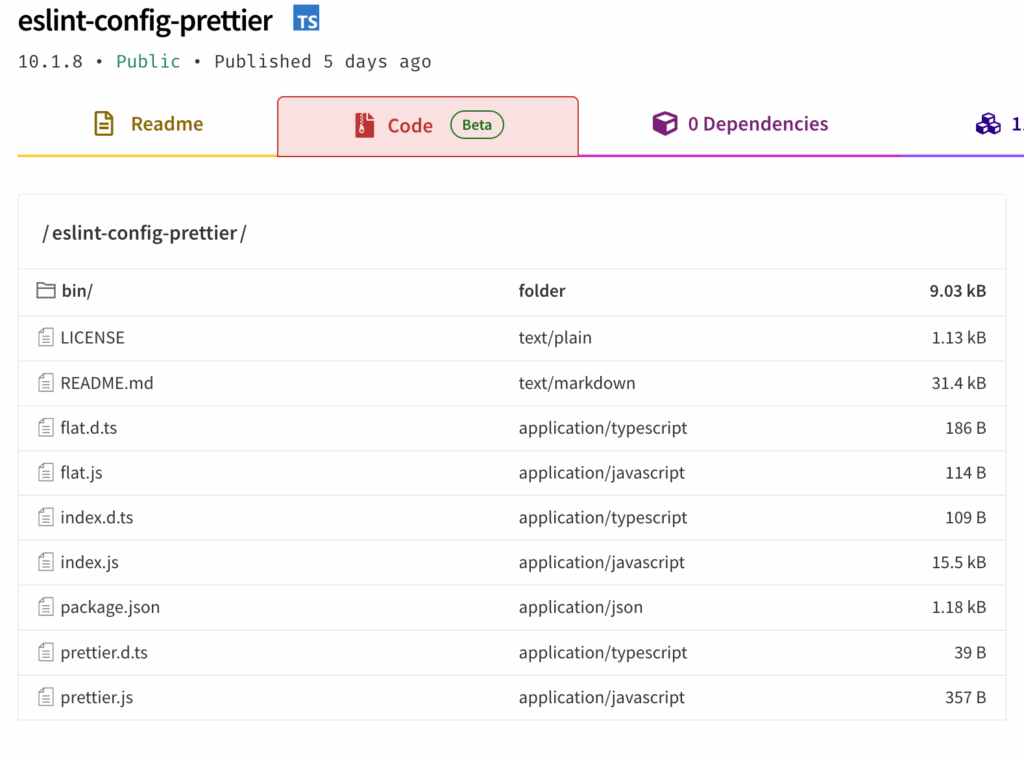
The presence of green checkmarks indicating “provenance” from GitHub Actions is also not a foolproof guarantee; while intended to assure integrity, the tokens used in CI/CD pipelines can themselves be compromised. If the packages you regularly use have provenance checkmarks, they can provide a level of assurance if newer packages are published that are compromised. In some recent npm package compromises, the provenance checkmarks indicated which versions were the correct ones to roll back into use.
CI/CD pipelines: A new target for stealer malware
Modern development heavily relies on CI/CD pipelines environment variables, like in GitHub Action runners or Jenkins servers, for automated publishing. These pipelines typically depend on tokens (NPM_TOKEN, NODE_AUTH_TOKEN) to publish packages. This convenience can introduce a new danger. Stealer malware is increasingly designed to scrape these environment variables, exfiltrating valuable tokens that can then be used by adversaries to publish their own malicious code. This means even if a developer’s personal machine is clean, a compromised CI/CD runner can become a launchpad for supply chain attacks.
Responding to a compromise
Effective response requires coordinated efforts from both developers (maintainers) and customers (users).
For developers: Eviction and mitigation
If your npm account or packages are compromised, immediate action is crucial:
Evict the adversary
- Set 2FA to most restrictive: Immediately change your account’s 2FA settings to require authentication for all actions, including publishing.
- Reset password: Change your npm account password to a strong, unique one.
- Reset all issued tokens: This is paramount. Revoke and regenerate any npm tokens, especially those used in CI/CD pipelines. This should sever the adversary’s publishing access.
Address malicious versions
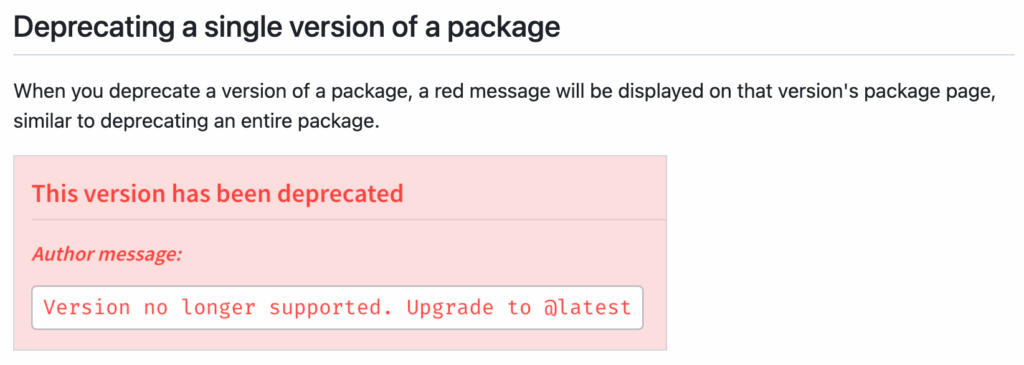
- Deprecate malicious versions: Crucially, manually deprecate any malicious versions of your package. This marks them as unsupported and issues a warning message to anyone attempting to install them. It also instructs automated tools like
npm installto avoid these versions in favor of known non-deprecated ones. You can even include a custom message guiding users to the correct version.
- Report to GitHub: Once deprecated, report the compromise to the npm registry’s security staff, which oversees the
npmjs.orgregistry and will verify the malicious content and permanently remove those versions from the registry. This developer action provides an immediate safeguard (deprecation) while awaiting full removal.
A note on deprecation: Deprecation does not remove a package from the registry; it merely marks it as unsupported. Inside NodeJS packages, there’s a package.json file with dependencies. For users relying on latest versions or automatic updates (e.g., using @latest or >x.y.z versioning), developers can pin those dependencies to a specific version ensuring npm will automatically select the newest non-deprecated compatible version, something that helps protect many users.
For users: Protection and remediation
As a consumer of npm packages, your response is equally important:
Delete affected packages under node_modules
- The simplest immediate step is to delete the specific compromised package’s folder within your project’s
node_modulesdirectory. - When you next run
npm install(or a similar command), if the malicious versions have been deprecated or removed, npm will automatically pull the known good version, effectively cleaning your local project.
Pin to known good versions
- For critical dependencies—if developers haven’t deprecated the correct version or if malicious versions are still being served—it’s a best practice for customers to manually pin their project to a specific, known-good version number in your
package.jsonconfiguration file (in the instance ofeslint-config-prettier:10.1.5instead of10.0.0orlatest). - This prevents automatic upgrades to potentially compromised newer versions, providing a strong defense. The trade-off is that you’ll need to manually evaluate and update to new versions as they are released. A key to success is leaving room for new, bleeding-edge versions to stabilize before adopting the new versions. In many recent cases, the malicious package versions were discovered within a day. Therefore, having a requirement that packages be older than a few days before adopting can help organizations.
Understand execution flow and plan for deeper remediation
- Malicious npm packages can execute code in various ways. In the
prettiercompromise, the malware spawnedRunDll32.exe, creating easily observable process telemetry. - However, if an adversary embeds malicious Node.js code directly (e.g., in
install.cjs), all malicious activity (like data exfiltration or RAT operations) would occur within the mainnodeprocess. This makes detection significantly harder as it wouldn’t spawn suspicious child processes. Security teams need to adapt to look for anomalous network connections or file system changes from seemingly legitimatenodeprocesses. - Depending on the malware’s capabilities (e.g., dropping persistent DLLs, affecting browser experience), additional remediation steps beyond simple package deletion may be required, potentially including full system reimaging to ensure complete eradication.
Looking forward
GitHub, for its part, recently announced plans to implement enhanced security measures like mandatory 2FA and trusted publishing, urging maintainers to adopt stronger practices to secure the ecosystem. Still, recent npm package compromises underscore the critical need for vigilance and proactive security measures across the entire software supply chain.
By understanding the adversary’s playbook and implementing robust defensive strategies, both developers and users can contribute to a more secure and trustworthy open-source ecosystem.
Red Canary’s Intelligence team continues to analyze malware associated with ongoing npm compromises to improve our threat detection capabilities. Organizations looking to further harden their npm attack surface can also consult OWASP’s npm security best practices, again including ensuring two-factor authentication (2FA) is enabled for any accounts with publishing rights to the npm package repository and using a local npm proxy to cache known good npm packages for use internally.
Related Articles
AI and browser threats stand out in the 2026 Threat Detection Report
Moving up the Assemblyline: Exposing malicious code in browser extensions
Moving up the Assemblyline: Exposing malicious code in browser extensions
Hunting for malicious OpenClaw AI in the modern enterprise
Hunting for malicious OpenClaw AI in the modern enterprise
Breaking down a supply chain attack leveraging a malicious Google Workspace OAuth app