
Most security teams are staring across a massive adversary emulation gap. The bridge between “knowing the threat” and “executing realistic tests” has historically involved rigid scripts, manual overhead, and precious time.
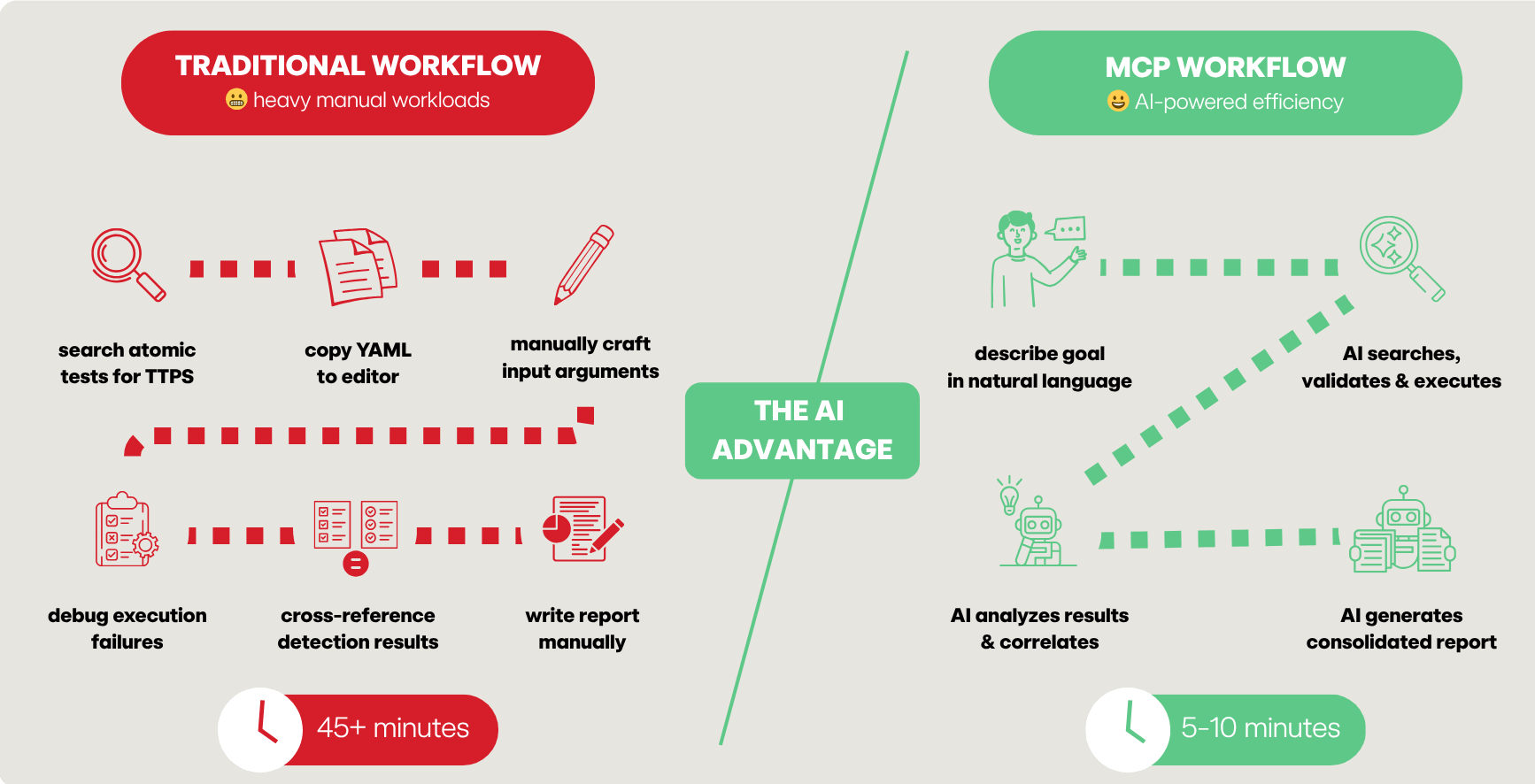
Previously, defenders had to manually search threat intel reports, identify tactics, techniques and procedures (TTPs), hunt through a repository for matches, and then manually craft YAML playbooks. If you weren’t a dedicated red teamer, the barrier to entry for tools like Atomic Red Team could feel like climbing Mount Kilimanjaro without the proper gear.
Then came the AI inflection point.
We’ve moved past the era of AI as a simple chatbot and into the era of AI-powered workflows. The missing link hasn’t been the intelligence of the models, but the connectivity between the human brain and the digital tools. In a recent episode of SecOps Weekly, security engineer and Atomic Red Team maintainer Hare Sudhan unveiled the Atomic Red Team Model Context Protocol (MCP) server and how it is supercharging red team actions for blue team success.
The missing link
By introducing an MCP server into the mix, the “protocol mismatch” between LLMs and security tooling is effectively solved. As Phil describes it, MCP acts as the “glue” between the front ends (like Claude or VS Code) and the back ends (your security tools and related data sets). An MCP server creates a “fuzzy API,” a paradigm shift where you no longer need to be a syntax expert to run sophisticated adversary emulations. You describe the intent in natural language, and the MCP-enabled AI handles the execution.
What is the Model Context Protocol (MCP)?
Think of an MCP server as a “USB-C port” or a plug-and-play thumb drive for AI. Just as a flash drive adds storage and files to your computer, an MCP server adds specific “skills” and tools to your LLM.
The protocol is structured around three main components:
- MCP Host: The machine where the AI application (Claude Desktop, IDEs) lives
- MCP Client: The specific tool (Claude, Gemini, etc.) that maintains the connection
- MCP Server: The engine that exposes tools, resources, and prompts; can be local (via STDIO) for privacy or hosted via HTTP for an enterprise team to share
The power of a “single pane of glass”
One of the most transformative aspects of MCP is the ability to “mix and match” servers. In a modern workflow, you aren’t just using the Atomic Red Team MCP; you are orchestrating an entire stack:
- Jira MCP: To read the requirements of a specific detection ticket
- GitHub MCP: To pull the latest code or push a new atomic test via pull request (PR)
- Atomic Red Team MCP: To find and execute the emulation
- Splunk/Elastic MCP: To query your SIEM and see if the test actually fired a detection
This eliminates the “context switching” that so often eats away at your team’s productivity. You no longer need to copy YAML files between machines, RDP into Windows systems, or copy-paste error messages into Google to debug a failed test.
How is the Atomic Red Team MCP server different?
The Atomic Red Team MCP server integrates over 1,500+ focused security tests from the free and open source Atomic Red Team project directly into the hands of your AI assistant. Beyond simple searching, the server enables a self-healing validation loop. If you use this AI-based technology stack to create a new atomic test, it uses the validate_atomic tool to check for schema errors. If it fails, the AI reads the error, reiterates, and fixes the YAML automatically until it’s syntactically perfect.
Below are the Atomic Red Team MCP server’s core tools:
| Tool name | Description |
query_atomics | Search by technique ID, name, or platform |
execute_atomic | Run tests (opt-in, lab only) |
validate_atomic | Iteratively validate and fix YAML schemas |
server_info | Critical for multi-platform labs. It tells the AI which server is Windows, Linux, or MacOS so it can route the right test to the right machine |
refresh_atomics | Syncs your local library with the latest GitHub updates |
get_validation_schema | Provides the “rulebook” to the AI so it knows exactly which executors (e.g., PowerShell or Bash) are supported |
Example scenarios
Scenario 1: Threat intel → playbook (the Atomic stealer example)
Goal: Build an executable playbook from a raw threat report
Prompt: Here is a report on the Atomic MacOS stealer. Find all matching atomics. If they don’t exist, create them.
Automated workflow:
- The AI parses the report for TTPs (e.g., VM sandbox detection via System Profiler)
- It calls
query_atomicsto find matches - For gaps, it uses the
validation_schemato write a brand-new atomic test - It runs
validate_atomicto ensure the YAML is PR-ready
Result: You move from a PDF report to a validated, executable test in minutes, not hours
Timeline:
| Step | Manual | With MCP |
| TTP extraction | 15 min | 30 sec |
| Library search | 20 min | 1 min |
| Gap analysis | 10 min | 1 min |
| Total | 45+ min | 5 min |
Scenario 2: Multi-platform detection validation
Goal: Validate a new Splunk detection rule for Protocol Tunneling (T1572)
Prompt: I wrote a Splunk detection for Cloudflare tunnel abuse (T1572). Validate it by running the relevant atomic tests.
Automated workflow:
- The AI identifies the relevant tests for Windows and Linux
- It uses
server_infoto find the correct target machines in your lab -
execute_atomictriggers the telemetry - The AI queries the SIEM MCP to check for hits, identifying exactly where your detection logic needs tuning
Result: Rule recommendations in ≤ 5 minutes, as opposed to 30 minutes manually
Some other possible use cases for the MCP server-brokered access to Atomic Red Team content are below. As you experiment in your own environment, consider using them as starting points or inspiration for your own use cases.
Scenario 3: Multi-platform persistence
Goal: Simulate a threat actor establishing persistence across your entire fleet
Prompt: Simulate T1547.001 registry persistence on Windows and T1053.003 cron persistence on Linux simultaneously.
Scenario 4: AI-assisted atomic test creation
Goal: Create an atomic test for a new CVE
Prompt: There’s no atomic test for the technique in this CVE <include link or CVE document>. Create one of the following ATT&CK standards and validate it.

Getting started
To install using Claude CLI at the bash prompt, use the following commands:
# Using uvx (recommended for virtual env management)
claude mcp add atomic-red-team-mcp -- uvx atomic-red-team-mcp# Or using pip
pip install atomic-red-team-mcp
claude mcp add atomic-red-team-mcp -- atomic-red-team-mcpTo enable the ability to run tests, you must explicitly set the environment variable ART_EXECUTION_ENABLED=true.
WARNING: Only run execution-enabled tools in a dedicated lab environment!
To install using Claude Desktop, add the following to your claude_desktop_config.json:
{
  "mcpServers": {
    "atomic-red-team": {
      "command": "uvx",
      "args": [ "atomic-red-team-mcp" ],
      "env": {
        "ART_EXECUTION_ENABLED": "true"
      }
    }
  }
}
Closing the gap
The convergence of AI and Atomic Red Team via MCP isn’t just a technical novelty; it’s a force multiplier. We’ve moved from “knowing the threat” to “interrogating the threat” in natural language.
This approach allows defenders to spend less time wrestling with scripts and more time analyzing telemetry and refining detection logic.
The bridge between intelligence and execution is finally built. Now, it’s time to cross it.
Resources
- GitHub repo
- Hare’s blog
- Docker
- PyPI:
uvx atomic-red-team-mcp
Related Articles
Emu-lation: Validating detections for SocGholish with Atomic Red Team