
Highlights from May
Coming in at number one on our top 10 most prevalent threat list, for the second month running, is ClearFake. ClearFake is an activity cluster that uses JavaScript injected into compromised websites to deliver malware via drive-by download techniques, often using fake CAPTCHA lures to trick users into executing code via malicious copy and paste (aka paste and run, ClickFix, fakeCAPTCHA). This technique remains a very effective and popular initial execution technique—appearing in the delivery and/or execution chain of 7 threats in this month’s top 10:
- ClearFake
- MacSync Stealer
- NetSupport Manager
- ACR Stealer
- Atomic Stealer
- HijackLoader*
- Scarlet Goldfinch
*This is HijackLoader’s first appearance in the top 10 since September 2025
Since this technique is widely used by a variety of adversaries, the command lines and parent processes also vary a lot more than when paste and run first gained widespread use. Here are some recent examples we saw in May 2026:
| Associated threat | Paste and run command |
|---|---|
| Associated threat: | Paste and run command:
|
| Associated threat: | Paste and run command:
|
| Associated threat: | Paste and run command:
|
| Associated threat: | Paste and run command:
|
Kali365 makes its debut in 2nd place on our top 10 list. Kali365 is a phishing-as-a-service (PhaaS) platform that automates OAuth device code phishing and adversary-in-the-middle (AitM) session capture attacks targeting Microsoft 365 environments.
Due to overlapping detection signals, we initially tracked this activity as GraphRunner—a post-exploitation toolset for interacting with the Microsoft Graph API that enables reconnaissance, persistence, and data exfiltration from Microsoft Entra ID accounts—which is why GraphRunner appeared on last month’s top 10 list, tied for 6th place. As part of our ongoing research, we identified an increase in Kali365-specific activity and expanded our detection coverage to track observed device code abuse in a more granular way. You can read more about Kali365 below.
TeamPCP reappeared on our top 10 list as part of this month’s tie for 7th. TeamPCP is a sophisticated criminal group conducting coordinated supply chain attacks and cloud-native infrastructure compromises for ransomware deployment, credential harvesting, and coinmining. May’s campaign, dubbed “Mini Shai-Hulud” by researchers, ran a self-propagating worm across npm and PyPI ecosystems, using a malicious TanStack CI workflow commit as their entry point. TanStack did a thorough investigation and shared their findings publicly.
This month’s top 10 threats
To track pervasiveness over time, we identify the number of unique customer environments in which we observed a given threat and compare it to what we’ve seen in previous months.
Here’s how the numbers shook out for May 2026:
| Month's rank | Threat name | Threat description |
|---|---|---|
| Month's rank: ⮕ 1 | Threat name: | Threat description : Activity cluster that uses JavaScript injected into compromised websites to deliver malware via drive-by download techniques, often using fake CAPTCHA lures to trick users into executing code via malicious copy and paste |
| Month's rank: ⬆ 2 | Threat name: Kali365 | Threat description : Phishing-as-a-service (PhaaS) platform that automates OAuth device code phishing and adversary-in-the-middle (AitM) session capture attacks targeting Microsoft 365 environments |
| Month's rank: ⬆ 3 | Threat name: | Threat description : macOS threat designed with the goal of accessing sensitive information including credentials, payment card data, keychain details, and cryptocurrency wallets |
| Month's rank: ⬇ 4 | Threat name: | Threat description : Legitimate ConnectWise product that administrators use and adversaries abuse to remotely access and manage devices |
| Month's rank: ⬆ 5 | Threat name: | Threat description : Legitimate remote access tool (RAT) that can be used as a trojan by adversaries to remotely control victim endpoints for unauthorized access |
| Month's rank: ⬆ 6 | Threat name: | Threat description : Sophisticated criminal group conducting coordinated supply chain attacks and cloud-native infrastructure compromises for ransomware deployment, credential harvesting, and coinmining |
| Month's rank: ⬇ 7* | Threat name: | Threat description : Malware-as-a-Service (MaaS) information stealer written in C++ that has been active since 2024 |
| Month's rank: ⬇ 7* | Threat name: | Threat description : Information stealer designed to target data within web browsers and locally stored files on macOS systems, with the goal of accessing sensitive information including credentials, payment card data, keychain details, and cryptocurrency wallets |
| Month's rank: ⬆ 7* | Threat name: | Threat description : Malware loader that uses DLL sideloading to deliver additional payloads through process injection |
| Month's rank: ⬇ 7* | Threat name: | Threat description : Red Canary's name for an activity cluster that uses compromised web sites to trick users into executing malicious code |
⬆ = trending up from previous month
⬇= trending down from previous month
➡ = no change in rank from previous month
*Denotes a tie
Conned and caught: Kali365
In April and May 2026, we observed a significant rise in OAuth device code phishing attempts against Microsoft Entra ID tenants. Device code phishing is not new; we’ve been reporting on it since 2022. This kind of phishing takes advantage of the OAuth device authorization grant, a legitimate authorization flow intended for devices or workflows where input constraints prevent full browser-based authentication. You’re familiar with this pattern if you’ve ever logged into a smart TV, printer, or command line interface (CLI) by entering a short one-time code. The device authorization grant prevents users from directly entering credentials on untrusted devices while taking advantage of multi-factor authentication (MFA), device compliance, and other contextual access controls enforced by the identity provider (IdP). However, offloading authentication to a secondary, trusted device is exactly what makes this an attractive target for adversaries.
The recent increase in device code phishing attempts is largely due to the widespread commoditization of device code abuse by subscription-based phishing-as-a-service (PhaaS) platforms like Kali365, which debuted in our top 10 this month in 2nd place. Kali365 was first publicly reported by Arctic Wolf in April 2026. According to a May 2026 announcement by the FBI, access to the platform is primarily provided via Telegram. Once onboarded, adversaries have access to dedicated tenant environments with customizable UIs, AI-generated phishing lures, and post-exploitation reconnaissance and discovery capabilities.
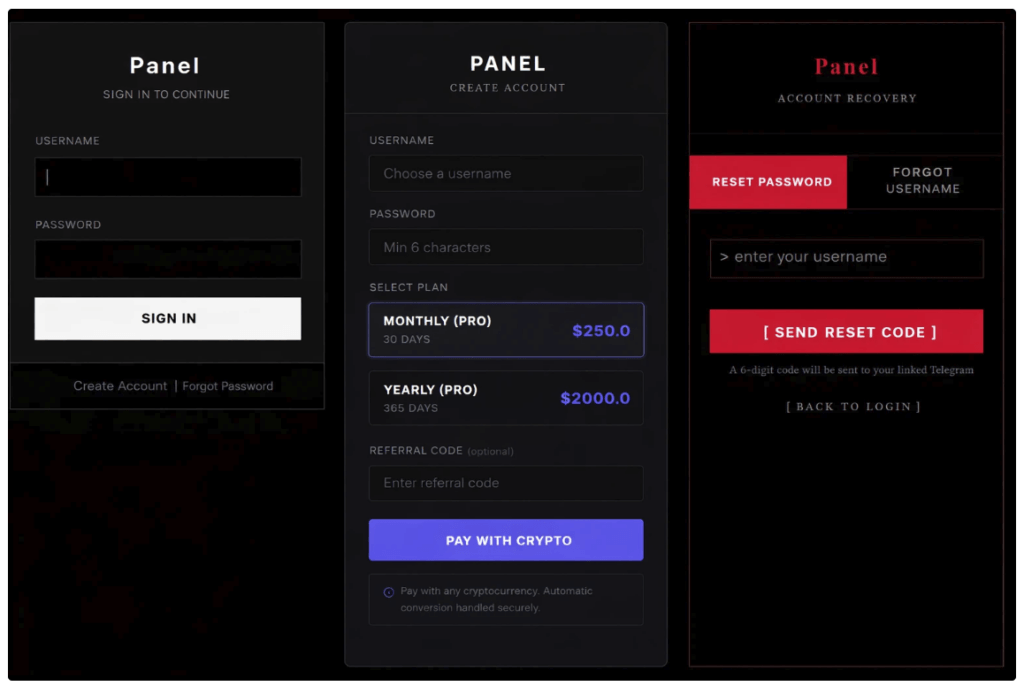
Kali365 account landing page from Arctic Wolf
Red Canary-observed attack chains follow a similar pattern, starting with delivery of targeted phishing emails impersonating common enterprise applications, with titles like DocuSign – Signature Required: {sender} Requested Your Signature and SharePoint – Document Shared: {sender} Shared a File With You. The emails contain a link to an adversary-controlled URL, typically using free Cloudflare web development infrastructure and related domains, for example workers[.]dev and pages[.]dev.
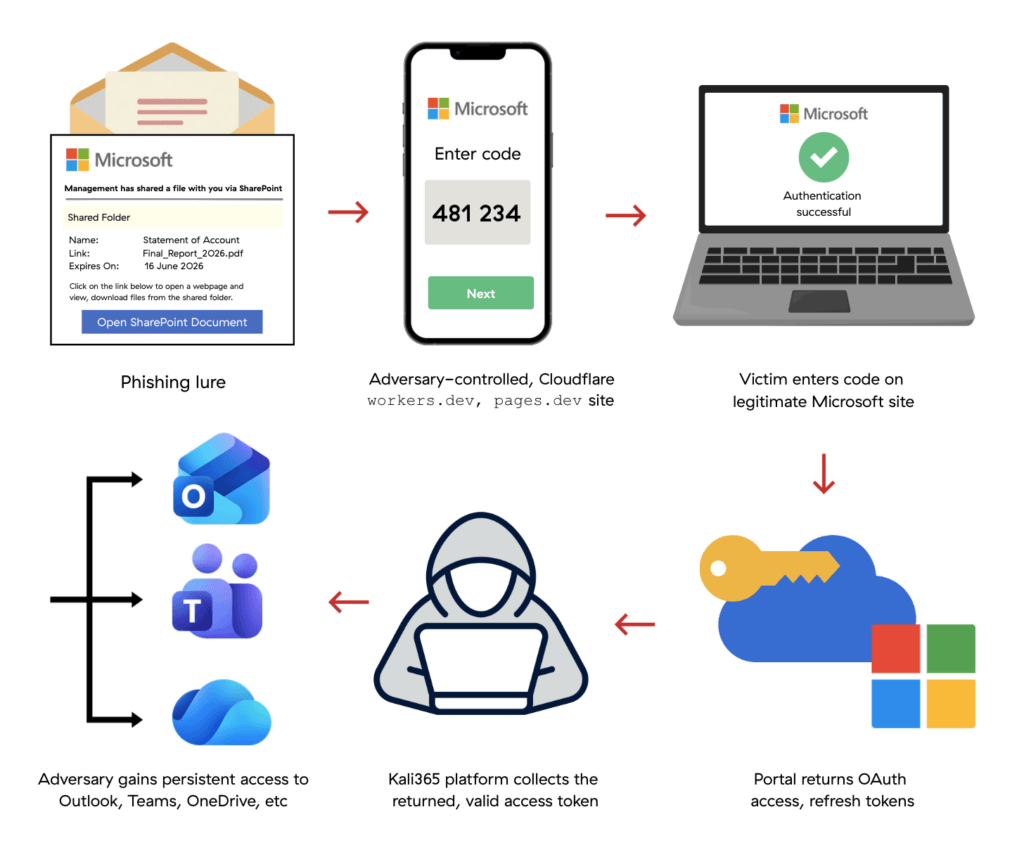
When the victim clicks the link, they’re taken to a well-formatted, appropriately branded landing page containing both a real-time generated user_code and a link to the legitimate Microsoft authentication portal. If the victim enters the user_code and completes authorization—including the satisfaction of Conditional Access policies—the Kali365 platform collects the returned, valid access token.
These events appear in Entra ID sign-in logs as AuthenticationProtocol:deviceCode and ExtendedProperties.RequestType:Cmsi:Cmsi, typically followed by a refresh token redemption (IncomingTokenType:refreshToken) from a different IP address—a strong indicator of token theft. Authentication events typically originate from Microsoft Office (d3590ed6-52b3-4102-aeff-aad2292ab01c) and target Microsoft Graph (00000003-0000-0000-c000-000000000000).
After gaining initial access, adversaries attempted a variety of actions including:
- Gaining persistence by changing the victim’s password
- Registering a new device under adversary control
- Engaging in business email compromise (BEC) activity like deleting the original phishing email and creating inbox rules to hide emails that might alert the victim to suspicious activity
To protect against potential device code abuse, we recommend implementing Conditional Access policies to:
- Block the device code authentication flow for all users, restricting flow access to a documented exception group containing the service accounts and devices with legitimate business requirements.
- Require periodic user reauthentication to limit session lifetimes.
- Enforce token protection to ensure stolen tokens can’t be used from another device.
Red Canary has observed successful Kali365 follow-on activity that is common to business email compromises (BEC), including creating suspiciously-named inbox rules to hide emails that might alert the victim to malicious activity. That gives us a detection opportunity.
Detection opportunity: Identify instances of email rule creation using only special characters for the rule name
This pseudo-detection analytic identifies instances of email rule creation using only special characters for the rule name. Adversaries who have gained access to a mailbox—including those who did so via Kali365—may create an overly simple rule name, like one that only consists of special characters, to avoid drawing suspicion or to move quickly and avoid detection. The rule’s filter conditions will typically target important documents, like legal forms or payroll documents, and/or redirect emails into an unused folder like “Conversation History” or “Deleted Items.” It’s possible a user could do this legitimately to quickly create a rule. If so, they’ll likely have a history of simply-named rules, and the matching filters will typically apply to unimportant items like spam or junk mail.
email_rule_created_or_modified
&&
email_rule_name_matches ( ^[$@$!%*?&#^\-_. +;,\/:]+$)