
In this third and final installment on investigating Microsoft Entra Agent ID events, we’ll highlight one last agent authentication scenario: assistive agents, aka the On behalf of flow (OBO).
According to Microsoft’s documentation:
“…assistive agents (also called interactive agents) perform specific tasks on demand on behalf of a signed-in user, often through a chat interface. Tasks include analyzing customer data for sales recommendations or answering support questions with escalation to human representatives. These agents are granted Microsoft Entra delegated permissions that allow them to act on behalf of users. Common scenarios include customer support assistants, research helpers, and real-time collaboration agents.”
For example, imagine starting a Copilot chat in Entra where you prompt the agent to perform certain administrative tasks based on the roles and permissions granted to your user.
In order for a user to grant an agent permission to act on its behalf, the user first needs to grant access to the agent’s underlying blueprint principal by requesting its access_agent scope. This means that the agent blueprint, per sparse documentation, needs to implement the access_agent scope in order to support an OBO flow. In the scenario that will follow, the user, matt@ContosoCorp.onmicrosoft.com, consented to the access_agent scope of the Dev Agent Identity Blueprint - NOT FOR PROD blueprint principal, which was highlighted in previous posts, by navigating to the following URI:
https://login.microsoftonline.com/adcb5820-70a1-4272-b79c-32f2bba44ddc/oauth2/v2.0/authorize?client_id=14d82eec-204b-4c2f-b7e8-296a70dab67e&response_type=code&redirect_uri=http://localhost/&response_mode=query&scope=api://beddadf7-4f3b-4e9b-8443-0b0cf777446e/access_agentThe components in the URI are as follows:
adcb5820-70a1-4272-b79c-32f2bba44ddc: The user’s Entra tenant ID14d82eec-204b-4c2f-b7e8-296a70dab67e: The Entra client application to which you want to grantaccess_agent. This GUID corresponds to the Microsoft Graph Command Line Tools app.http://localhost/: The redirect URI for the Microsoft Graph Command Line Tools app. Note: This is what enabled me to capture the resulting authorization code locally, which I was then able to use to request an access token targeting the agent blueprint principal. For additional reference, localhost redirects are also abused by adversaries employing the ConsentFix technique.beddadf7-4f3b-4e9b-8443-0b0cf777446e: The agent blueprint to which the user is consenting.
The consent dialog will appear as the following:
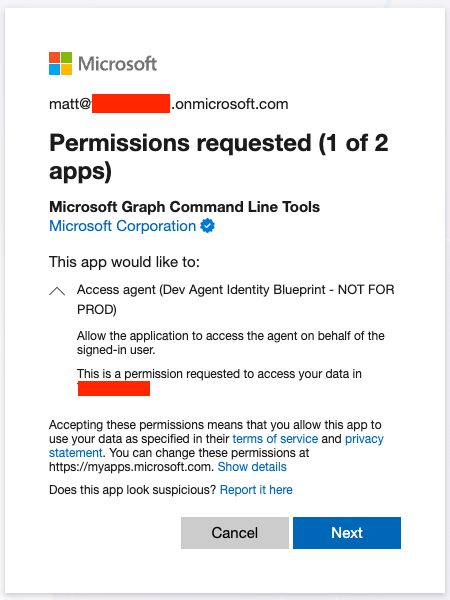
With consent granted, at this point an agent can now act on behalf of the user, however, the actual authorization granted will consist of the intersection of the permissions granted to the agent identity and the assigned roles of the user. As highlighted in Part 1, most dangerous permissions (e.g., User.ReadWrite.All) cannot be granted to an agent in order to minimize the potential for damage. That certainly doesn’t mean that an agent can’t be influenced (or when compromised) to perform malicious activity.
We’ll now investigate a scenario where an agent acting on behalf of a user sent a suspicious email.
Scenario: An agent sends a suspicious email on behalf of a human identity
A suspicious email with “invoice” in the subject line was sent to an external email address. Here is the raw Purview log that we’ll break down and use as the basis for building out a minimum viable story:
{
  "AgentBlueprintId": "beddadf7-4f3b-4e9b-8443-0b0cf777446e",
  "AgentId": "8cd0a10f-0be8-413a-9bf2-f44bc568d1e4",
  "AppAccessContext": {
    "AADSessionId": "003066ba-089b-fe8a-f68e-78764ba250c4",
    "APIId": "00000003-0000-0000-c000-000000000000",
    "ClientAppId": "8cd0a10f-0be8-413a-9bf2-f44bc568d1e4",
    "IssuedAtTime": "2026-05-08T15:21:45",
    "UniqueTokenId": "G3_-L_huWkKI8Larz0xVAA"
  },
  "CreationTime": "2026-05-08T15:27:05",
  "Id": "d8727a2e-67e7-403a-cc72-08dead16430e",
  "Operation": "Send",
  "OrganizationId": "adcb5820-70a1-4272-b79c-32f2bba44ddc",
  "RecordType": 2,
  "ResultStatus": "Succeeded",
  "SubjectType": "3 8",
  "UserKey": "00000000-0000-0000-0000-000000000000",
  "UserType": 11,
  "Version": 1,
  "Workload": "Exchange",
  "ClientIP": "40.126.23.26",
  "UserId": "matt@ContosoCorp.onmicrosoft.com",
  "ActorInfoString": "Client=REST;Mozilla/5.0 (Macintosh; macOS 26.4.1; en-US) PowerShell/7.6.1[AppId=8cd0a10f-0be8-413a-9bf2-f44bc568d1e4];",
  "AppId": "00000003-0000-0000-c000-000000000000",
  "AuthType": "MSAuth1.0",
  "ClientIPAddress": "40.126.23.26",
  "ClientInfoString": "Client=REST;;",
  "ClientRequestId": "eea70650-ba24-4bde-9e6b-31684bf172ad",
  "ExternalAccess": false,
  "HostAppId": "c999ed3e-27ae-4cb3-b3a2-46b056af63d3",
  "InternalLogonType": 0,
  "LogonType": 0,
  "LogonUserSid": "S-1-5-21-835130139-2367991628-4097896528-11684066",
  "MailboxGuid": "b9ef9602-e111-403c-94c2-34ec7311ff8a",
  "MailboxOwnerSid": "S-1-5-21-835130139-2367991628-4097896528-11684066",
  "MailboxOwnerUPN": "matt@ContosoCorp.onmicrosoft.com",
  "OrganizationName": "ContosoCorp.onmicrosoft.com",
  "OriginatingServer": "DM3P220MB1171 (15.20.4200.000)\r\n",
  "SessionId": "003066ba-089b-fe8a-f68e-78764ba250c4",
  "TokenObjectId": "986b1d1b-d0b4-4ee6-bb5b-02e58d437abe",
  "TokenTenantId": "adcb5820-70a1-4272-b79c-32f2bba44ddc",
  "TokenType": "AadPft",
  "Item": {
    "Id": "RgAAAAAH+eMyr+SxTrjx7QJPl98wBwD1xVtvhDVGTKuBZrgrF26wAAAAAAEPAAD1xVtvhDVGTKuBZrgrF26wAAMEB59wAAAJ",
    "ImmutableId": "LgAAAAAdhAMRqmYRzZvIAKoAL8RaDQD1xVtvhDVGTKuBZrgrF26wAAMECBTpAAAJ",
    "InternetMessageId": "<DM3P220MB117179B5327655E440A44AC3E93D2@DM3P220MB1171.NAMP220.PROD.OUTLOOK.COM>",
    "ParentFolder": {
      "Id": "LgAAAAAH+eMyr+SxTrjx7QJPl98wAQD1xVtvhDVGTKuBZrgrF26wAAAAAAEPAAAB",
      "Path": "\\Drafts"
    },
    "Recipients": [
      {
        "Address": "bigwig_CFO@importantcompany.com",
        "Name": "bigwig_CFO@importantcompany.com"
      }
    ],
    "RecipientsCount": 1,
    "SizeInBytes": 2790,
    "Subject": "Here is your invoice"
  },
  "SaveToSentItems": false
}This event can be summarized as follows:
At
2026-05-08T15:27:05Z, within Entra ID tenant IDadcb5820-70a1-4272-b79c-32f2bba44ddc, the agent identity8cd0a10f-0be8-413a-9bf2-f44bc568d1e4sent an email on behalf ofmatt@ContosoCorp.onmicrosoft.comtobigwig_CFO@importantcompany.comwith a subject line of“Here is your invoice”. The email originated from IP address40.126.23.26using the following user-agent string:Mozilla/5.0 (Macintosh; macOS 26.4.1; en-US) PowerShell/7.6.1
Field derivation for the event summary:
| Question | Field name | Value |
| Who | AgentId, UserId | 8cd0a10f-0be8-413a-9bf2-f44bc568d1e4,
|
| What | Workload, Operation,Recipients.Address,Subject | Exchange, Send,bigwig_CFO@importantcompany.com,Here is your invoice |
| When | CreationTime | 2026-05-08T15:27:05 |
| Where | OrganizationId | adcb5820-70a1-4272-b79c-32f2bba44ddc |
| Whence | ClientIP | 40.126.23.26, which is a MSFT IP. Is this reliable? |
| How | ActorInfoString | Mozilla/5.0 (Macintosh; macOS 26.4.1; en-US) PowerShell/7.6.1 |
What questions remain that would help fill in any missing details?
- When did
matt@ContosoCorp.onmicrosoft.comauthenticate and from where? The IP address is Microsoft infrastructure. Didmatt@ContosoCorp.onmicrosoft.comauthenticate and make the request to send that message from that IP address? - How did
matt@ContosoCorp.onmicrosoft.comgrant access to the8cd0a10f-0be8-413a-9bf2-f44bc568d1e4agent identity. - What is the
8cd0a10f-0be8-413a-9bf2-f44bc568d1e4agent identity?
To address the first question and to confirm the means by which the email was sent, we have enough information in the event above to directly correlate the exact Graph API request. The following fields will be used to perform correlation to the specific, corresponding MicrosoftGraphActivityLogs event:
| Original log table | Field name | Log table to correlate to | Correlated field name |
Purview - | AppAccessContext.UniqueTokenId | MicrosoftGraphActivityLogs | SignInActivityId |
Purview - | ClientRequestId | MicrosoftGraphActivityLogs | ClientRequestId |
Corresponding Graph API activity
When correlated, the corresponding Graph API log confirms that the Graph API was used to send the email along with the true IP address, 51.3.97.221:
{
  "TenantId": "855f09b2-b284-45cb-af48-6d9ee72abb2b",
  "TimeGenerated": "2026-05-08T15:27:05.9217985Z",
  "Location": "East US",
  "RequestId": "e79793d3-148b-47a4-be4b-af5120b39e00",
  "OperationId": "e79793d3-148b-47a4-be4b-af5120b39e00",
  "ClientRequestId": "eea70650-ba24-4bde-9e6b-31684bf172ad",
  "ApiVersion": "beta",
  "RequestMethod": "POST",
  "ResponseStatusCode": "202",
  "AadTenantId": "adcb5820-70a1-4272-b79c-32f2bba44ddc",
  "IPAddress": "51.3.97.221",
  "UserAgent": "Mozilla/5.0 (Macintosh; macOS 26.4.1; en-US) PowerShell/7.6.1",
  "RequestUri": "https://graph.microsoft.com/beta/users/matt@ContosoCorp.onmicrosoft.com/microsoft.graph.sendMail",
  "DurationMs": "4626806",
  "ResponseSizeBytes": "0",
  "SignInActivityId": "G3_-L_huWkKI8Larz0xVAA",
  "Roles": "",
  "SessionId": "003066ba-089b-fe8a-f68e-78764ba250c4",
  "DeviceId": "",
  "UniqueTokenId": "",
  "TokenIssuedAt": "2026-05-08T15:21:45Z",
  "AppId": "8cd0a10f-0be8-413a-9bf2-f44bc568d1e4",
  "UserId": "986b1d1b-d0b4-4ee6-bb5b-02e58d437abe",
  "ServicePrincipalId": "",
  "Scopes": "Group.Read.All Mail.ReadWrite Mail.Send MailboxSettings.ReadWrite User.Read openid profile email",
  "IdentityProvider": "",
  "ClientAuthMethod": "2",
  "Wids": "62e90394-69f5-4237-9190-012177145e10 b79fbf4d-3ef9-4689-8143-76b194e85509",
  "ATContent": "",
  "ATContentH": "",
  "ATContentP": "",
  "SourceSystem": "",
  "Type": "MicrosoftGraphActivityLogs"
}
Finally, we’ll use the AppAccessContext.UniqueTokenId to retrieve the corresponding AADNonInteractiveUserSignInLogs event and answer the remaining two questions regarding the identity of 8cd0a10f-0be8-413a-9bf2-f44bc568d1e4.
Corresponding sign-in activity
Here is the corresponding sign-in event for the agent that performed the activity:
 {
  "TenantId": "855f09b2-b284-45cb-af48-6d9ee72abb2b",
  "SourceSystem": "Azure AD",
  "TimeGenerated": "2026-05-08T15:28:55.5845975Z",
  "OperationName": "Sign-in activity",
  "OperationVersion": "1.0",
  "Category": "NonInteractiveUserSignInLogs",
  "ResultType": "0",
  "ResultSignature": "SUCCESS",
  "ResultDescription": "",
  "DurationMs": "0",
  "CorrelationId": "432ea15c-55fa-4132-ae78-cfcfb4405a96",
  "ResourceGroup": "Microsoft.aadiam",
  "Identity": "Matt Graeber",
  "Level": "",
  "Location": "US",
  "AADTenantId": "adcb5820-70a1-4272-b79c-32f2bba44ddc",
  "Agent": {
    "agentType": "agenticAppInstance",
    "parentAppId": "beddadf7-4f3b-4e9b-8443-0b0cf777446e",
    "agentSubjectType": "notAgentic"
  },
  "AlternateSignInName": "",
  "AppDisplayName": "Agent001",
  "AppId": "8cd0a10f-0be8-413a-9bf2-f44bc568d1e4",
  "AppliedEventListeners": null,
  "AppOwnerTenantId": "",
  "AuthenticationContextClassReferences": [],
  "AuthenticationDetails": {
    "authenticationStepDateTime": "2026-05-08T11:26:45.5640057-04:00",
    "authenticationMethod": "Previously satisfied",
    "authenticationMethodDetail": "",
    "succeeded": true,
    "authenticationStepResultDetail": "MFA requirement satisfied by claim in the token",
    "authenticationStepRequirement": ""
  },
  "AuthenticationMethodsUsed": "",
  "AuthenticationProcessingDetails": [
    {
      "key": "Legacy TLS (TLS 1.0, 1.1, 3DES)",
      "value": "False"
    },
    {
      "key": "Oauth Scope Info",
      "value": "[\"Group.Read.All\",\"Mail.ReadWrite\",\"Mail.Send\",\"MailboxSettings.ReadWrite\",\"User.Read\",\"openid\",\"profile\",\"email\"]"
    },
    {
      "key": "Is Legacy Store Used",
      "value": "False"
    },
    {
      "key": "Is CAE Token",
      "value": "False"
    }
  ],
  "AuthenticationProtocol": "none",
  "AuthenticationRequirement": "multiFactorAuthentication",
  "AuthenticationRequirementPolicies": {
    "requirementProvider": "user",
    "detail": "Per-user MFA"
  },
  "AuthenticatorAppLocation": "",
  "AutonomousSystemNumber": "14618",
  "ClientAppUsed": "Browser",
  "ClientCredentialType": "federatedIdentityCredential",
  "ConditionalAccessAudiences": [
    "cc15fd57-2c6c-4117-a88c-83b1d56b4bbe",
    "00000002-0000-0ff1-ce00-000000000000",
    "00000003-0000-0ff1-ce00-000000000000",
    "00000002-0000-0000-c000-000000000000"
  ],
  "ConditionalAccessPolicies": [],
  "ConditionalAccessPoliciesV2": null,
  "ConditionalAccessStatus": "notApplied",
  "CreatedDateTime": "2026-05-08T15:26:45.5640057Z",
  "CrossTenantAccessType": "none",
  "DeviceDetail": {
    "deviceId": "",
    "operatingSystem": "MacOs",
    "browser": "",
    "isCompliant": false,
    "isManaged": false
  },
  "FederatedCredentialId": "1a418fdb-5c5e-4f99-b98c-098d13e240ee",
  "GlobalSecureAccessIpAddress": "",
  "HomeTenantId": "adcb5820-70a1-4272-b79c-32f2bba44ddc",
  "HomeTenantName": "",
  "Id": "2ffe7f1b-6ef8-425a-88f0-b6abcf4c5500",
  "IncomingTokenType": "none",
  "IPAddress": "51.3.97.221",
  "IsInteractive": "false",
  "IsRisky": null,
  "IsTenantRestricted": "false",
  "IsThroughGlobalSecureAccess": "false",
  "LocationDetails": {
    "city": "Ashburn",
    "state": "Virginia",
    "countryOrRegion": "US",
    "geoCoordinates": {
      "latitude": 39.043701171875,
      "longitude": -77.47419738769531
    }
  },
  "MfaDetail": "",
  "NetworkLocationDetails": {
    "networkType": "namedNetwork",
    "networkNames": [
      "USA"
    ]
  },
  "OriginalRequestId": "2ffe7f1b-6ef8-425a-88f0-b6abcf4c5500",
  "OriginalTransferMethod": "none",
  "ProcessingTimeInMs": "175",
  "ResourceDisplayName": "Microsoft Graph",
  "ResourceIdentity": "00000003-0000-0000-c000-000000000000",
  "ResourceOwnerTenantId": "f8cdef31-a31e-4b4a-93e4-5f571e91255a",
  "ResourceServicePrincipalId": "4e881284-c6b3-489e-b241-ec8f35c65dd6",
  "ResourceTenantId": "adcb5820-70a1-4272-b79c-32f2bba44ddc",
  "RiskDetail": "none",
  "RiskEventTypes": [],
  "RiskEventTypes_V2": "",
  "RiskLevelAggregated": "none",
  "RiskLevelDuringSignIn": "none",
  "RiskState": "none",
  "ServicePrincipalId": "8cd0a10f-0be8-413a-9bf2-f44bc568d1e4",
  "SessionId": "003066ba-089b-fe8a-f68e-78764ba250c4",
  "SessionLifetimePolicies": [],
  "SignInEventTypes": ["nonInteractiveUser"],
  "SignInIdentifierType": "",
  "TokenProtectionStatusDetails": {
    "signInSessionStatus": "none",
    "signInSessionStatusCode": 1002
  },
  "Status": {
    "errorCode": 0,
    "additionalDetails": "MFA requirement satisfied by claim in the token"
  },
  "TokenIssuerName": "",
  "TokenIssuerType": "AzureAD",
  "UniqueTokenIdentifier": "G3_-L_huWkKI8Larz0xVAA",
  "UserAgent": "Mozilla/5.0 (Macintosh; macOS 26.4.1; en-US) PowerShell/7.6.1",
  "UserDisplayName": "Matt Graeber",
  "UserId": "986b1d1b-d0b4-4ee6-bb5b-02e58d437abe",
  "UserPrincipalName": "matt@ContosoCorp.onmicrosoft.com",
  "UserType": "Member",
  "Type": "AADNonInteractiveUserSignInLogs"
}
This sign-in event can be summarized as follows:
At
2026-05-08 15:26:45Z, within Entra ID tenantID adcb5820-70a1-4272-b79c-32f2bba44ddc, agent identityAgent001(ID:8cd0a10f-0be8-413a-9bf2-f44bc568d1e4) received a token on behalf ofmatt@ContosoCorp.onmicrosoft.comwith the following Microsoft Graph scopes:Group.Read.All Mail.ReadWrite Mail.Send MailboxSettings.ReadWrite User.Read openid profile email. The sign-in originated from IP address51.3.97.221and used the following user-agent:Mozilla/5.0 (Macintosh; macOS 26.4.1; en-US) PowerShell/7.6.1
Now, if you’re familiar with non-interactive sign-in logs, you may be wondering how that leap was made to claim that 8cd0a10f-0be8-413a-9bf2-f44bc568d1e4 was acting on behalf of matt@ContosoCorp.onmicrosoft.com. I was able to make that inference based on the Agent.agentType being set to agenticAppInstance and Agent.agentSubjectType being set to notAgentic. This indicates that an OBO flow occurred.
You may still be wondering though how I could make such a leap. This is why it is important to replicate each authentication type and observe how the generated logs are distinct from one another. The reference section below will spell out clearly how to discern the different agentic authentication flows. Microsoft doesn’t supply an explicit means of identifying the authentication flow so instead we are left to infer.
Storytime
With all the relevant data correlated (Exchange log, Graph API log, and non-interactive sign-in log), we can now produce an event summary that contains all the components necessary to articulate a minimum viable story. The original event summary can now be amended to more accurately reflect the activity as follows:
At
2026-05-08T15:27:05Z, within Entra ID tenant IDadcb5820-70a1-4272-b79c-32f2bba44ddc, the agent identityAgent001(ID:8cd0a10f-0be8-413a-9bf2-f44bc568d1e4) sent an email on behalf ofmatt@ContosoCorp.onmicrosoft.comusing the Microsoft Graph beta API tobigwig_CFO@importantcompany.comwith a subject line of“Here is your invoice”. The email originated from IP address51.3.97.221using the following user-agent string:Mozilla/5.0 (Macintosh; macOS 26.4.1; en-US) PowerShell/7.6.1
With proper event correlation in place, detection improves, enabling a more accurate and timely response.
Reference: Discerning agent authentication flows via sign-in logs
When building detections, performing threat hunting, and responding to incidents, it is important to be able to discern the type of identity and authentication flow that took place. For example, behaviors surrounding autonomous agent activity are expected to be distinct from agent user activity. Likewise, interactive human user behavior will certainly be distinct from agent activity in general.
Now that all three agent authentication scenarios have been covered in this blog post series, it would be helpful to succinctly highlight how to determine the corresponding authentication type based on specific sign-in logs attributes.
1. Autonomous agent sign-in
A sign-in event corresponds to an autonomous agent sign-in under the following conditions:
- Sign-in event table:
AADServicePrincipalSignInLogs Agent.agentType == agenticAppInstance
Under these conditions, the identity type will be an agent identity (as opposed to a service principal or managed identity). The key fields that describe the agent identity are as follows:
| Field description | Field name |
| Agent Identity Name | ServicePrincipalName |
| Agent Identity Object ID | ServicePrincipalId |
| Agent Identity Parent Blueprint ID | Agent.parentAppId |
2. Agent’s user account impersonation
A sign-in event corresponds to an agent’s user sign-in under the following conditions:
- Sign-in event table:
AADNonInteractiveUserSignInLogs Agent.agentType == agenticAppInstance AND Agent.agentSubjectType == agentIDuser- Optional confirmation:
AppId == ServicePrincipalId
Under these conditions, the identity type will be an agent user (as opposed to a standard user identity). The key fields that describe the agent identity are as follows:
| Field description | Field name |
| Agent User Name | UserPrincipalName |
| Agent User Object ID | UserId |
| Parent Agent Identity Object ID | Agent.agentSubjectParentId |
| Agent Identity Parent Blueprint ID | Agent.parentAppId |
3) Assistive agent on-behalf-of flow
A sign-in event corresponds to an assistive agent (aka on-behalf-of flow) sign-in under the following conditions:
- Sign-in event table:
AADNonInteractiveUserSignInLogs Agent.agentType == agenticAppInstance AND Agent.agentSubjectType == notAgentic- Optional confirmation:
AppId == ServicePrincipalId
Under these conditions, the identity type will be an agent identity acting on behalf of a human user identity. The key fields that describe the agent identity are as follows:
| Field description | Field name |
| Agent User Name | AppDisplayName |
| Agent User Object ID | AppId |
| Human User Name | UserPrincipalName |
| Human User Object ID | UserId |
| Agent Identity Parent Blueprint ID | Agent.parentAppId |
Conclusion
If you’ve made it this far through this series of posts, congratulations. With Entra Agent ID, there is no shortage of new and expanded concepts that you need to understand if you are to make sense of how to detect and investigate agentic activity. As AI agents continue to explode in adoption, defenders have little choice but to learn how to detect, articulate what happened, and remediate suspicious and malicious agentic behaviors. But regardless of the identity type employed (agentic, user, workload), what remains key is identifying what logs are necessary to tell a minimum viable story as well as the means by which correlation to other data sources is possible. You can’t tell a complete story without the right data, properly correlated.
We hope that these posts have been a helpful foundation and reference for investigating Entra Agent ID activity. Expect more posts in the future that will build upon this foundation.
Appendix: Auditing interactive agent consent grants
In order to grant an agent identity the ability to act on behalf of a user identity, the user needs to first consent to the access_agent scope of the corresponding agent blueprint. When investigating an incident or in just trying to understand what agents users are consenting to in your environment, it will be helpful to pull audit logs for the granted consent. The log you’ll want to target is the Add delegated permission grant operation in the AuditLogs table. Here is the corresponding event generated for the consent granted highlighted at the beginning of this post:
{
  "TenantId": "855f09b2-b284-45cb-af48-6d9ee72abb2b",
  "SourceSystem": "Azure AD",
  "TimeGenerated": "2026-05-08T15:06:23.4442014Z",
  "ResourceId": "/tenants/adcb5820-70a1-4272-b79c-32f2bba44ddc/providers/Microsoft.aadiam",
  "OperationName": "Add delegated permission grant",
  "OperationVersion": "1.0",
  "Category": "ApplicationManagement",
  "ResultType": "",
  "ResultSignature": "None",
  "ResultDescription": "",
  "DurationMs": "0",
  "CorrelationId": "896d9798-09a4-4fb2-ad69-e51456887721",
  "Resource": "Microsoft.aadiam",
  "ResourceGroup": "Microsoft.aadiam",
  "ResourceProvider": "",
  "Identity": "Azure ESTS Service",
  "Level": "",
  "Location": "",
  "AdditionalDetails": [
    {
      "key": "User-Agent",
      "value": "EvoSTS"
    },
    {
      "key": "AppId",
      "value": "beddadf7-4f3b-4e9b-8443-0b0cf777446e"
    },
    {
      "key": "ServicePrincipalProvisioningType",
      "value": "Other"
    }
  ],
  "Id": "Directory_896d9798-09a4-4fb2-ad69-e51456887721_0S5SC_4388216",
  "InitiatedBy": {
    "user": {
      "displayName": "Azure ESTS Service",
      "agentType": "notAgentic",
      "id": "986b1d1b-d0b4-4ee6-bb5b-02e58d437abe",
      "userPrincipalName": "matt@ContosoCorp.onmicrosoft.com",
      "ipAddress": "20.106.103.146",
      "roles": []
    }
  },
  "LoggedByService": "Core Directory",
  "Result": "success",
  "ResultReason": "",
  "TargetResources": [
    {
      "id": "96529a00-a78b-41d9-bcbe-2d9288cb76e1",
      "displayName": "Dev Agent Identity Blueprint - NOT FOR PROD",
      "type": "ServicePrincipal",
      "modifiedProperties": [
        {
          "displayName": "DelegatedPermissionGrant.Scope",
          "oldValue": null,
          "newValue": " access_agent"
        },
        {
          "displayName": "DelegatedPermissionGrant.ConsentType",
          "oldValue": null,
          "newValue": "AllPrincipals"
        },
        {
          "displayName": "ServicePrincipal.ObjectID",
          "oldValue": null,
          "newValue": "97c1b9e9-9640-40b0-9034-bed04e92fdd8"
        },
        {
          "displayName": "ServicePrincipal.DisplayName",
          "oldValue": null,
          "newValue": null
        },
        {
          "displayName": "ServicePrincipal.AppId",
          "oldValue": null,
          "newValue": null
        },
        {
          "displayName": "ServicePrincipal.Name",
          "oldValue": null,
          "newValue": null
        },
        {
          "displayName": "TargetId.ServicePrincipalNames",
          "oldValue": null,
          "newValue": "api://beddadf7-4f3b-4e9b-8443-0b0cf777446e;beddadf7-4f3b-4e9b-8443-0b0cf777446e"
        }
      ],
      "administrativeUnits": [],
      "agentType": "notAgentic"
    },
    {
      "id": "97c1b9e9-9640-40b0-9034-bed04e92fdd8",
      "displayName": null,
      "type": "ServicePrincipal",
      "modifiedProperties": [],
      "administrativeUnits": [],
      "agentType": "notAgentic"
    }
  ],
  "AADTenantId": "adcb5820-70a1-4272-b79c-32f2bba44ddc",
  "ActivityDisplayName": "Add delegated permission grant",
  "ActivityDateTime": "2026-05-08T15:06:23.4442014Z",
  "AADOperationType": "Assign",
  "Type": "AuditLogs"
}The event is summarized as follows:
At
2026-05-08 15:06:23Z, within Entra ID tenant IDadcb5820-70a1-4272-b79c-32f2bba44ddc,matt@ContosoCorp.onmicrosoft.comconsented to theaccess_agentscope of theDev Agent Identity Blueprint - NOT FOR PRODagent blueprint principal.
You can infer that the target is a blueprint principal based on the fact that the access_agent scope was granted. The only way to 100 percent confirm though is by enriching the service principal object with Graph API.
Related Articles
Train, triage, repeat: The AI agent changing how we fight phishing
The dual-use dilemma: Rethinking detection for remote access tool abuse
The dual-use dilemma: Rethinking detection for remote access tool abuse
Investigating suspicious AI workflows in Microsoft Entra Agent ID: Agent’s user account