
In Part 1 of this blog series, we covered suspicious Entra tenant activity originating from an autonomous agent. In this post, we will investigate suspicious Teams activity originating from an agent user.
Agent users are tailored for scenarios where human users directly interact with agents (e.g. @-messaging in Teams, or sending/forwarding an email to an agent) that, like their human counterparts, require access to licensed products in order to automate activity typically performed by humans (e.g., sending emails, sending messages, etc.). This scenario requires a specific identity type that can, like a human identity, perform actions as if it were an interactive user, all with its own specific roles and permissions assigned to it.
Agent users extend the Graph API user resource type but the way in which they are provisioned and authenticated is unique. An agent user, when created, is required to be associated with an agent identity.
Scenario: An agent user sent a suspicious Teams message
Imagine the following scenario: A user received the following message in their Teams chat.
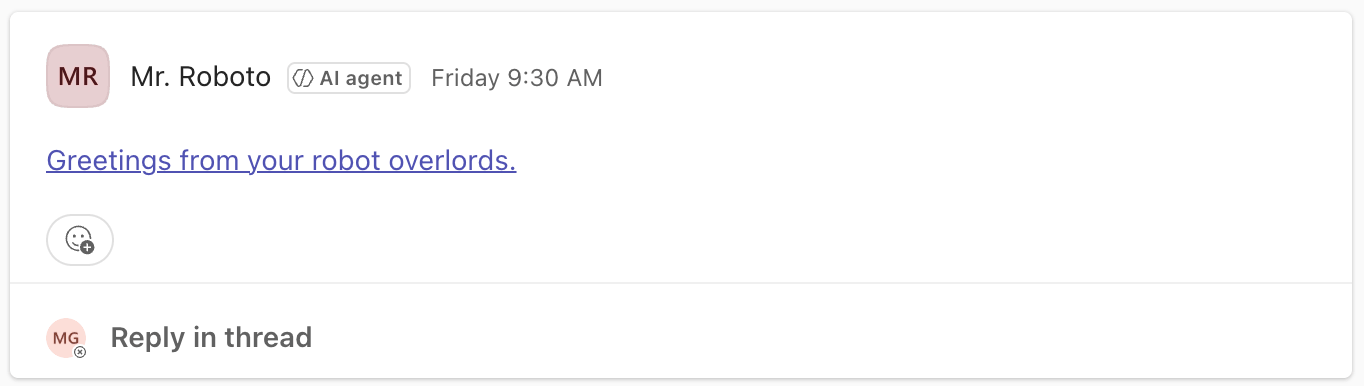
Well, it’s at least convenient that Microsoft indicates that the message was sent by an agent. An agent could never be compelled to send a malicious link, could it?
The user did the right thing and reported the message as suspicious.
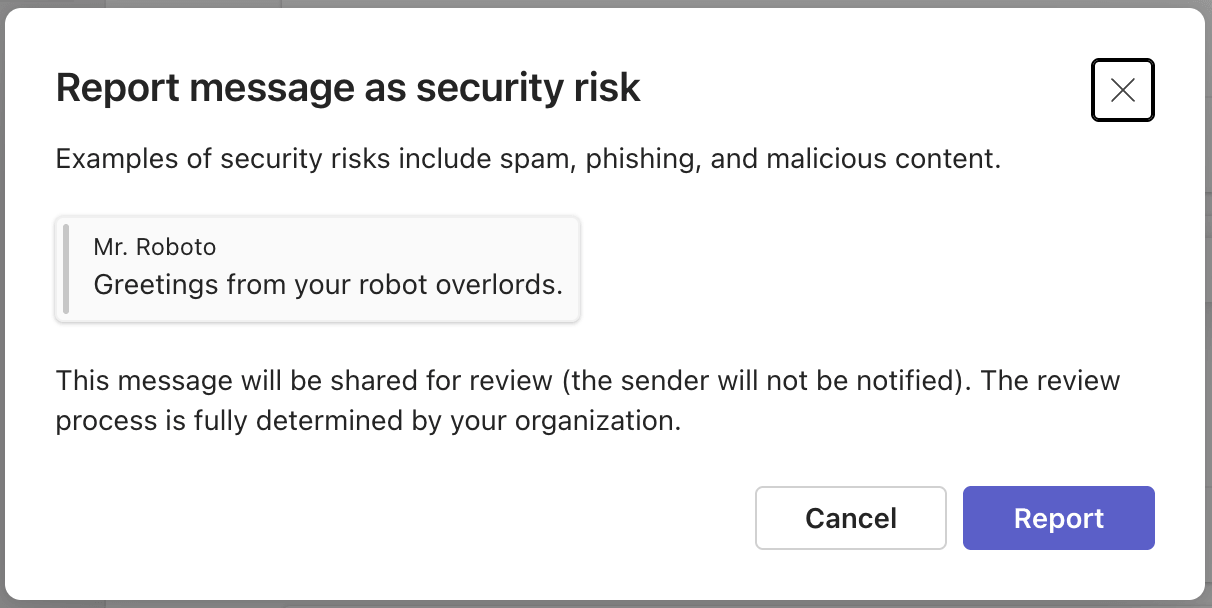
Now, what do we, as detection engineers responsible for building a detection and enrichment pipeline, need to do next? Let’s start with all of the relevant raw data needed to tell that minimum viable story.
Corresponding raw data
Presuming we decided to build a detection pipeline around user-reported content, we would require log data that would capture context surrounding the reported message. Fortunately, Purview supplies such an event via the MessageReported operation:
{
  "CreationTime": "2026-05-09T13:15:30",
  "Id": "9953617b-2240-4c79-ad69-6c3b3aff038c",
  "Operation": "MessageReported",
  "OrganizationId": "adcb5820-70a1-4272-b79c-32f2bba44ddc",
  "RecordType": 462,
  "UserKey": "986b1d1b-d0b4-4ee6-bb5b-02e58d437abe",
  "UserType": 0,
  "Version": 1,
  "Workload": "MicrosoftTeams",
  "UserId": "matt@ContosoCorp.onmicrosoft.com",
  "ReportMetadata": {
    "ChatThreadId": "19:uNtsZo9h3pW-VHvV0sqIixfxWy-4ow3S_cvzGPiiSMI1@thread.tacv2",
    "MessageId": "1778247017240",
    "ViolationType": "Security",
    "Sender": {
      "MRI": "8:orgid:5e411314-4d6a-4c6d-b8e7-fd75d22c1bdd",
      "OrganizationId": "adcb5820-70a1-4272-b79c-32f2bba44ddc",
      "UserObjectId": "5e411314-4d6a-4c6d-b8e7-fd75d22c1bdd"
    }
  },
  "SubmissionId": "5e98eabef5ea551db4e9daa0264515b4"
}
What is this event telling us?
At
2026-05-09T13:15:30Z, within Entra ID tenant IDadcb5820-70a1-4272-b79c-32f2bba44ddc,matt@ContosoCorp.onmicrosoft.comreported a suspicious Teams message (Message ID:1778247017240) that was sent by a user (ID:5e411314-4d6a-4c6d-b8e7-fd75d22c1bdd).
What questions remain?
- What was the Teams message?
- Who is user
5e411314-4d6a-4c6d-b8e7-fd75d22c1bdd? - How did user
5e411314-4d6a-4c6d-b8e7-fd75d22c1bddsend the message and from what IP address?
What was the Teams message?
The MessageReported event above supplies us with the message ID that is needed to directly correlate the events we need, specifically, MessageSent and MessageCreatedHasLink:
[
{
  "AppAccessContext": {
    "AADSessionId": "004d8baa-b221-0d98-bc8a-53e765d90db9",
    "IssuedAtTime": "2026-05-08T13:00:40",
    "UniqueTokenId": "H4wVauHVxk6DMWzOc2NtAA"
  },
  "CreationTime": "2026-05-08T13:30:17",
  "Id": "1b820751-6780-5d2e-adaa-17554629a737",
  "Operation": "MessageSent",
  "OrganizationId": "adcb5820-70a1-4272-b79c-32f2bba44ddc",
  "RecordType": 25,
  "UserKey": "5e411314-4d6a-4c6d-b8e7-fd75d22c1bdd",
  "UserType": 0,
  "Version": 1,
  "Workload": "MicrosoftTeams",
  "ClientIP": "::ffff:70.152.145.147",
  "UserId": "MrRoboto4@ContosoCorp.onmicrosoft.com",
  "AADGroupId": "25f8b45d-bbac-4457-8da3-92c88a62fa80",
  "ChannelGuid": "19:uNtsZo9h3pW-VHvV0sqIixfxWy-4ow3S_cvzGPiiSMI1@thread.tacv2",
  "ExtraProperties": [],
  "MessageId": "1778247017240",
  "MessageVersion": "1778247017240",
  "ParentMessageId": "1778247017240",
  "ParticipantInfo": {
    "HasForeignTenantUsers": false,
    "HasGuestUsers": false,
    "HasOtherGuestUsers": false,
    "HasUnauthenticatedUsers": false,
    "ParticipatingDomains": [],
    "ParticipatingSIPDomains": []
  },
  "ResourceTenantId": "adcb5820-70a1-4272-b79c-32f2bba44ddc",
  "TeamGuid": "19:uNtsZo9h3pW-VHvV0sqIixfxWy-4ow3S_cvzGPiiSMI1@thread.tacv2",
  "ChannelName": "General",
  "ItemName": "General",
  "TeamName": "Our Team"
},
{
  "AppAccessContext": {
    "AADSessionId": "004d8baa-b221-0d98-bc8a-53e765d90db9",
    "IssuedAtTime": "2026-05-08T13:00:40",
    "UniqueTokenId": "H4wVauHVxk6DMWzOc2NtAA"
  },
  "CreationTime": "2026-05-08T13:30:17",
  "Id": "70e0017a-ef8c-56f6-b5cd-1f245b4c4ea5",
  "Operation": "MessageCreatedHasLink",
  "OrganizationId": "adcb5820-70a1-4272-b79c-32f2bba44ddc",
  "RecordType": 25,
  "UserKey": "5e411314-4d6a-4c6d-b8e7-fd75d22c1bdd",
  "UserType": 0,
  "Version": 1,
  "Workload": "MicrosoftTeams",
  "ClientIP": "::ffff:70.152.145.147",
  "UserId": "MrRoboto4@ContosoCorp.onmicrosoft.com",
  "AADGroupId": "25f8b45d-bbac-4457-8da3-92c88a62fa80",
  "ChannelGuid": "19:uNtsZo9h3pW-VHvV0sqIixfxWy-4ow3S_cvzGPiiSMI1@thread.tacv2",
  "ExtraProperties": [],
  "IsBilateral": false,
  "MessageId": "1778247017240",
  "MessageLinks": [
    {
      "Url": "https://domoarigato.ai/"
    }
  ],
  "MessageVersion": "1778247017240",
  "ParentMessageId": "1778247017240",
  "ParticipantInfo": {
    "HasForeignTenantUsers": false,
    "HasGuestUsers": false,
    "HasOtherGuestUsers": false,
    "HasUnauthenticatedUsers": false,
    "ParticipatingDomains": [],
    "ParticipatingSIPDomains": []
  },
  "ResourceTenantId": "adcb5820-70a1-4272-b79c-32f2bba44ddc",
  "TeamGuid": "19:uNtsZo9h3pW-VHvV0sqIixfxWy-4ow3S_cvzGPiiSMI1@thread.tacv2",
  "ChannelName": "General",
  "ItemName": "General",
  "MessageURLs": [
    "https://domoarigato.ai/"
  ],
  "TeamName": "Our Team"
}
]The events above can be summarized as follows:
At
2026-05-08T13:30:17Z, within Entra ID tenant IDadcb5820-70a1-4272-b79c-32f2bba44ddc,MrRoboto4@ContosoCorp.onmicrosoft.com(ID:5e411314-4d6a-4c6d-b8e7-fd75d22c1bdd) sent a message from IP address::ffff:70.152.145.147to teamOur Teamin theGeneralchannel that contained a link tohttps://domoarigato.ai/.
Field derivation for the event summary:
| Question | Operation name | Field name | Value |
| Who | MessageCreatedHasLink | UserId | MrRoboto4@ContosoCorp.onmicrosoft.com |
| What | MessageCreatedHasLink | TeamName,
| Our Team,
|
| When | MessageCreatedHasLink | CreationTime | 2026-05-08T13:30:17 |
| Where | MessageCreatedHasLink | OrganizationId | adcb5820-70a1-4272-b79c-32f2bba44ddc |
| Whence | MessageCreatedHasLink | ClientIP | ::ffff:70.152.145.147, which is a MSFT IP.Is this reliable? See note below |
| How | Not available | Not available | Not available |
Now we have the actual link contained in the message that we can quickly enrich and investigate. Assuming it’s malicious, do we have all the context we’d need to scope and launch an investigation? No. The following questions remain.
- Who really is
MrRoboto4@ContosoCorp.onmicrosoft.com? Is it a human user or agent? We saw in the screenshot that it was an agent but we have no evidence as of yet in the log data to indicate that it was an agent. - How did
MrRoboto4@ContosoCorp.onmicrosoft.comsend the message? - When did
MrRoboto4@ContosoCorp.onmicrosoft.comauthenticate and from where? The IPv6 address is Microsoft infrastructure. DidMrRoboto4@ContosoCorp.onmicrosoft.comauthenticate and make the request to send that message from that IP address?
In order to answer these questions, we’ll need both MicrosoftGraphActivityLogs events and sign-in events. Fortunately, the AppAccessContext.UniqueTokenId (Value: H4wVauHVxk6DMWzOc2NtAA) field gives us what we need to directly correlate to these log sources.
The following fields will be used to perform correlation:
| Original log table | Field name | Log table to correlate to | Correlated field name |
Purview - MicrosoftTeams | AppAccessContext.UniqueTokenId | MicrosoftGraph | SignInActivityId |
Purview - MicrosoftTeams | AppAccessContext.UniqueTokenId | AADNonInteractive | UniqueTokenIdentifier |
How was the message sent?
With a correlated MicrosoftGraphActivityLogs log entry, we can see more clearly how the suspicious Teams message was sent:
{
  "TenantId": "855f09b2-b284-45cb-af48-6d9ee72abb2b",
  "TimeGenerated": "2026-05-08T13:30:17.4952831Z",
  "Location": "East US",
  "RequestId": "79ec6e85-f7d9-413d-a3ed-8c44d6c67d35",
  "OperationId": "79ec6e85-f7d9-413d-a3ed-8c44d6c67d35",
  "ClientRequestId": "0ad35b81-68a1-4ad6-b1c6-bbb013da8b2b",
  "ApiVersion": "beta",
  "RequestMethod": "POST",
  "ResponseStatusCode": "201",
  "AadTenantId": "adcb5820-70a1-4272-b79c-32f2bba44ddc",
  "IPAddress": "51.3.97.221",
  "UserAgent": "Mozilla/5.0 (Macintosh; macOS 26.4.1; en-US) PowerShell/7.6.1",
  "RequestUri": "https://graph.microsoft.com/beta/teams/be391302-bbc4-412b-af64-836dff973fb0/channels/19:uNtsZo9h3pW-VHvV0sqIixfxWy-4ow3S_cvzGPiiSMI1@thread.tacv2/messages",
  "DurationMs": "20622483",
  "ResponseSizeBytes": "1414",
  "SignInActivityId": "H4wVauHVxk6DMWzOc2NtAA",
  "Roles": "",
  "SessionId": "004d8baa-b221-0d98-bc8a-53e765d90db9",
  "DeviceId": "",
  "UniqueTokenId": "",
  "TokenIssuedAt": "2026-05-08T13:00:40Z",
  "AppId": "8cd0a10f-0be8-413a-9bf2-f44bc568d1e4",
  "UserId": "5e411314-4d6a-4c6d-b8e7-fd75d22c1bdd",
  "ServicePrincipalId": "",
  "Scopes": "ChannelMessage.Send Group.Read.All Mail.ReadWrite MailboxSettings.ReadWrite openid Team.ReadBasic.All TeamSettings.ReadWrite.All User.Read User.Read.All profile email",
  "IdentityProvider": "",
  "ClientAuthMethod": "2",
  "Wids": "b79fbf4d-3ef9-4689-8143-76b194e85509",
  "ATContent": "",
  "ATContentH": "",
  "ATContentP": "",
  "SourceSystem": "",
  "Type": "MicrosoftGraphActivityLogs"
}This event reveals additional, important context, namely:
- The actual request to send the suspicious message originated from IP
51.3.97.221. This is distinct from the Microsoft IPv6 request present in theMessageCreatedHasLinkevent. - This Graph API event confirms that the Teams message was sent using the Graph API using a user-agent string of:
Mozilla/5.0 (Macintosh; macOS 26.4.1; en-US) PowerShell/7.6.1 - We can see the OAuth scopes granted to the user (via the
Scopesfield) which indicate that the user has the ability to perform operations in Teams and Exchange.f
What we still can’t answer as clearly though is who MrRoboto4@ContosoCorp.onmicrosoft.com is. We’ll rely upon the corresponding, correlated sign-in log to get that context.
Who is this user?
The corresponding non-interactive sign-in log supplies the remaining context needed about who MrRoboto4@ContosoCorp.onmicrosoft.com is as well as authentication context:
{
  "TenantId": "855f09b2-b284-45cb-af48-6d9ee72abb2b",
  "SourceSystem": "Azure AD",
  "TimeGenerated": "2026-05-08T13:08:24.0156057Z",
  "OperationName": "Sign-in activity",
  "OperationVersion": "1.0",
  "Category": "NonInteractiveUserSignInLogs",
  "ResultType": "0",
  "ResultSignature": "SUCCESS",
  "ResultDescription": "",
  "DurationMs": "0",
  "CorrelationId": "763730e5-d671-4457-b429-fc78d823daaf",
  "ResourceGroup": "Microsoft.aadiam",
  "Identity": "Mr. Roboto",
  "Level": "",
  "Location": "US",
  "AADTenantId": "adcb5820-70a1-4272-b79c-32f2bba44ddc",
  "Agent": {
    "agentType": "agenticAppInstance",
    "parentAppId": "beddadf7-4f3b-4e9b-8443-0b0cf777446e",
    "agentSubjectType": "agentIDuser",
    "agentSubjectParentId": "8cd0a10f-0be8-413a-9bf2-f44bc568d1e4"
  },
  "AlternateSignInName": "MrRoboto4@ContosoCorp.onmicrosoft.com",
  "AppDisplayName": "Agent001",
  "AppId": "8cd0a10f-0be8-413a-9bf2-f44bc568d1e4",
  "AppliedEventListeners": null,
  "AppOwnerTenantId": "",
  "AuthenticationContextClassReferences": [],
  "AuthenticationDetails": [],
  "AuthenticationMethodsUsed": "",
  "AuthenticationProcessingDetails": [
    {
      "key": "Legacy TLS (TLS 1.0, 1.1, 3DES)",
      "value": "False"
    },
    {
      "key": "Oauth Scope Info",
      "value": ["ChannelMessage.Send","Group.Read.All","Mail.ReadWrite","MailboxSettings.ReadWrite","openid","Team.ReadBasic.All","TeamSettings.ReadWrite.All","User.Read","User.Read.All","profile","email"]
    },
    {
      "key": "Is Legacy Store Used",
      "value": "False"
    },
    {
      "key": "Is CAE Token",
      "value": "False"
    }
  ],
  "AuthenticationProtocol": "none",
  "AuthenticationRequirement": "singleFactorAuthentication",
  "AuthenticationRequirementPolicies": [],
  "AuthenticatorAppLocation": "",
  "AutonomousSystemNumber": "14618",
  "ClientAppUsed": "Browser",
  "ClientCredentialType": "federatedIdentityCredential",
  "ConditionalAccessAudiences": [
    "cc15fd57-2c6c-4117-a88c-83b1d56b4bbe",
    "00000002-0000-0ff1-ce00-000000000000",
    "00000003-0000-0ff1-ce00-000000000000",
    "00000002-0000-0000-c000-000000000000"
  ],
  "ConditionalAccessPolicies": [],
  "ConditionalAccessPoliciesV2": null,
  "ConditionalAccessStatus": "notApplied",
  "CreatedDateTime": "2026-05-08T13:05:41.1244053Z",
  "CrossTenantAccessType": "none",
  "DeviceDetail": {
    "deviceId": "",
    "operatingSystem": "",
    "browser": "",
    "isCompliant": false,
    "isManaged": false
  },
  "FederatedCredentialId": "2b890532-58b1-46f6-adb5-7f6a7a31efa1",
  "GlobalSecureAccessIpAddress": "",
  "HomeTenantId": "adcb5820-70a1-4272-b79c-32f2bba44ddc",
  "HomeTenantName": "",
  "Id": "6a158c1f-d5e1-4ec6-8331-6cce73636d00",
  "IncomingTokenType": "none",
  "IPAddress": "51.3.97.221",
  "IsInteractive": "false",
  "IsRisky": null,
  "IsTenantRestricted": "false",
  "IsThroughGlobalSecureAccess": "false",
  "LocationDetails": {
    "city": "Ashburn",
    "state": "Virginia",
    "countryOrRegion": "US",
    "geoCoordinates": {
      "latitude": 39.043701171875,
      "longitude": -77.47419738769531
    }
  },
  "MfaDetail": "",
  "NetworkLocationDetails": {
    "networkType": "namedNetwork",
    "networkNames": [
      "USA"
    ]
  },
  "OriginalRequestId": "6a158c1f-d5e1-4ec6-8331-6cce73636d00",
  "OriginalTransferMethod": "none",
  "ProcessingTimeInMs": "175",
  "ResourceDisplayName": "Microsoft Graph",
  "ResourceIdentity": "00000003-0000-0000-c000-000000000000",
  "ResourceOwnerTenantId": "f8cdef31-a31e-4b4a-93e4-5f571e91255a",
  "ResourceServicePrincipalId": "4e881284-c6b3-489e-b241-ec8f35c65dd6",
  "ResourceTenantId": "adcb5820-70a1-4272-b79c-32f2bba44ddc",
  "RiskDetail": "none",
  "RiskEventTypes": "[]",
  "RiskEventTypes_V2": "",
  "RiskLevelAggregated": "none",
  "RiskLevelDuringSignIn": "none",
  "RiskState": "none",
  "ServicePrincipalId": "8cd0a10f-0be8-413a-9bf2-f44bc568d1e4",
  "SessionId": "004d8baa-b221-0d98-bc8a-53e765d90db9",
  "SessionLifetimePolicies": "[]",
  "SignInEventTypes": ["nonInteractiveUser"],
  "SignInIdentifierType": "",
  "TokenProtectionStatusDetails": {
    "signInSessionStatus": "none",
    "signInSessionStatusCode": 1002
  },
  "Status": {
    "errorCode": 0
  },
  "TokenIssuerName": "",
  "TokenIssuerType": "AzureAD",
  "UniqueTokenIdentifier": "H4wVauHVxk6DMWzOc2NtAA",
  "UserAgent": "Mozilla/5.0 (Macintosh; macOS 26.4.1; en-US) PowerShell/7.6.1",
  "UserDisplayName": "Mr. Roboto",
  "UserId": "5e411314-4d6a-4c6d-b8e7-fd75d22c1bdd",
  "UserPrincipalName": "mrroboto4@ContosoCorp.onmicrosoft.com",
  "UserType": "Member",
  "Type": "AADNonInteractiveUserSignInLogs"
}
The sign-in event supplies the remaining context about who MrRoboto4@ContosoCorp.onmicrosoft.com is, namely:
- It is an agent user whose linked agent identity is
8cd0a10f-0be8-413a-9bf2-f44bc568d1e4,as indicated byAgent.agentSubjectType == agentIDuser, which corresponds toAgent001, which was highlighted in Part 1 in this series of posts. - The parent blueprint of the agent identity is
beddadf7-4f3b-4e9b-8443-0b0cf777446e, as indicated byAgent.agentType == agenticAppInstance, that is,Dev Agent Identity Blueprint - NOT FOR PROD, which made an appearance in the last post as well.
Note: Agent user identities do not have their own credentials and as such, there will never be an interactive sign-in log for agent users, i.e. SigninLogs events. Agent user sign-in will only ever perform non-interactive sign-ins, i.e. sign-in events will only ever manifest in the AADNonInteractiveUserSignInLogs table.
Storytime
With all the relevant data correlated, we can now produce an event summary that contains all the components necessary to articulate a minimum viable story:
At
2026-05-09T13:15:30Z, within Entra ID tenant IDadcb5820-70a1-4272-b79c-32f2bba44ddc,matt@ContosoCorp.onmicrosoft.comreported a suspicious Teams message. The message, which contained an embedded link tohttps://domoarigato.ai/was sent at2026-05-08T13:30:17Zby agent userMrRoboto4@ContosoCorp.onmicrosoft.comvia a Graph API request from IP address51.3.97.221using the following user-agent:Mozilla/5.0 (Macintosh; macOS 26.4.1; en-US) PowerShell/7.6.1.
In order to populate this event summary, the following correlated log sources were required:
| Data source | Reason |
Purview:MicrosoftTeams events | To capture the MessageReported, MessageCreatedHasLink,and MessageSent operations necessary for Teams-specific context |
Log analytics:MicrosoftGraphActivityLogs | Supplied the means by which the message was sent, i.e,. the “how” |
Log analytics:AADNonInteractiveUserSignInLogs | Sign-in and identity context. This sign-in log confirmed that it was an agent user identity that sent the message along with agent identity and blueprint context. |
Remediation
If it was determined that MrRoboto4@ContosoCorp.onmicrosoft.com was sending malicious Teams messages, the logs above supply the information necessary to perform an initial remediation. The following remediations steps could be performed:
1. Delete the suspicious Teams message
By default, users cannot delete messages sent by agents. To enable the deletion of agent-derived messages, the Teams Messaging Policy must be updated.
Example remediation command:
$GroupId = 'be391302-bbc4-412b-af64-836dff973fb0'
$ChannelId = '19:uNtsZo9h3pW-VHvV0sqIixfxWy-4ow3S_cvzGPiiSMI1@thread.tacv2'
$ChatMessageId = '1778247017240'
Invoke-MgGraphRequest -Method POST -Uri "https://graph.microsoft.com/beta/teams/$GroupId/channels/$ChannelId/messages/$ChatMessageId/softDelete"Field derivation:
| Table | Field | Value |
| Purview – MicrosoftTeams, Operation: MessageCreatedHasLink | AADGroupId | be391302-bbc4-412b-af64-836dff973fb0 |
| Purview – MicrosoftTeams, Operation: MessageCreatedHasLink | ChannelGuid | 19:uNtsZo9h3pW-VHvV0sqIixfxWy-4ow3S_cvzGPiiSMI1@thread.tacv2 |
| Purview – MicrosoftTeams, Operation: MessageCreatedHasLink | MessageId | 1778247017240 |
2. Disable the suspect agent user until remediation is complete.
Example remediation command (requires AgentIdUser.ReadWrite.All permission):
Update-MgBetaUser -UserId 5e411314-4d6a-4c6d-b8e7-fd75d22c1bdd -AccountEnabled:$falseField derivation:
| Table | Field | Value |
| Purview – MicrosoftTeams, Operation: MessageCreatedHasLink | UserKey | 5e411314-4d6a-4c6d-b8e7-fd75d22c1bdd |
Conclusion
We’ve not only established how to contextualize agent user activity but we’ve also demonstrated yet again the critical importance of data source identification and correlation. There is rarely a single log that supplies the entirety of a “minimum viable story.” As threat hunters and detection engineers, we must know what data sources are necessary and the means by which they are correlated in order to paint a complete picture.
In the next and final post in this series, we’ll investigate a suspicious email sent by an agent on behalf of a legitimate human user.
Appendix: Code used to generate the logs
For those wanting to perform testing on their own and generate sample log data, here is the PowerShell script I wrote to perform the agent user flow and send the suspicious Teams message. It uses the PowerShell Microsoft.Graph.Beta module to automate Graph API operations.
$TargetEntraTenantID = 'INSERT_YOUR_TENANT_ID'
$BlueprintSecret = 'INSERT_BLUEPRINT_SECRET' # Do not use client secrets in prod...
$BlueprintID = 'INSERT_BLUEPRINT_ID' # i.e. the one you have the client secret to
$TargetAgentIdentityId = 'INSERT_AGENT_IDENTITY_ID' # i.e. the child agent identity of the blueprint principal that serves as the parent identity of the agent user.
$TargetLinkedAgentUserAccount = 'INSERT_AGENT_USER_UPN' # e.g. MrRoboto4@ContosoCorp.onmicrosoft.com


$TargetTeamName = 'Our Team'
$TargetChannelName = 'Team Chat'


# Follow the agent user flow documented here: https://learn.microsoft.com/en-us/entra/agent-id/agent-user-oauth-flow
# 1. Request an exchange token using the blueprint client secret to authenticate
$Result = Invoke-WebRequest -Uri "https://login.microsoftonline.com/$TargetEntraTenantID/oauth2/v2.0/token" -Method Post -ContentType 'application/x-www-form-urlencoded' -Body @"
client_id=$BlueprintID
&client_secret=$BlueprintSecret
&fmi_path=$TargetAgentIdentityId
&grant_type=client_credentials
&scope=api://AzureADTokenExchange/.default
"@


$Token = $Result.Content | ConvertFrom-Json


# 2. Agent identity requests a token to impersonate its linked agent user.
$Result = Invoke-WebRequest -Uri "https://login.microsoftonline.com/$TargetEntraTenantID/oauth2/v2.0/token" -Method Post -ContentType 'application/x-www-form-urlencoded' -Body @"
client_id=$TargetAgentIdentityId
&scope=api://AzureADTokenExchange/.default
&client_assertion_type=urn:ietf:params:oauth:client-assertion-type:jwt-bearer
&client_assertion=$($Token.access_token)
&grant_type=client_credentials
"@


$BearerToken = $Result.Content | ConvertFrom-Json


# Agent user obtains bearer token by sending an OBO token exchange request.
$Result = Invoke-WebRequest -Uri "https://login.microsoftonline.com/$TargetEntraTenantID/oauth2/v2.0/token" -Method Post -ContentType 'application/x-www-form-urlencoded' -Body @"
client_id=$TargetAgentIdentityId
&scope=https://graph.microsoft.com/.default
&client_assertion_type=urn:ietf:params:oauth:client-assertion-type:jwt-bearer
&client_assertion=$($Token.access_token)
&user_federated_identity_credential=$($BearerToken.access_token)
&username=$TargetLinkedAgentUserAccount
&grant_type=user_fic
&requested_token_use=on_behalf_of
"@


$AgentUserBearerToken = $Result.Content | ConvertFrom-Json
$AccessToken = ConvertTo-SecureString -String $AgentUserBearerToken.access_token -AsPlainText -Force


Connect-MgGraph -AccessToken $AccessToken


# Confirm the OAuth scope that your token is granted
(Get-MgContext).Scopes


$TargetTeam = Get-MgBetaTeam -Filter "displayName eq '$TargetTeamName'"
$TeamChannel = Get-MgBetaTeamChannel -TeamId $TargetTeam.Id -Filter "displayName eq '$TargetChannelName'"


# Send the suspicious message as the agent user
New-MgBetaTeamChannelMessage -TeamId $TargetTeam.Id -ChannelId $TeamChannel.Id -Body @{contentType = 'html'; content = '<a href="https://domoarigato.ai/">Greetings from your robot overlords.</a>'}


Disconnect-MgGraph
Related Articles
Train, triage, repeat: The AI agent changing how we fight phishing
The dual-use dilemma: Rethinking detection for remote access tool abuse
The dual-use dilemma: Rethinking detection for remote access tool abuse
Investigating suspicious AI workflows in Microsoft Entra Agent ID: Assistive agents