
AI agents are rapidly on their way to becoming the dominant actor within the environments we’re responsible for securing. Fortunately, vendors are starting to treat this new reality seriously by giving agents their own unique class of identity that can be managed, governed, and audited independent of human and traditional workload identities. However, detecting and responding to threats targeting this new class of identities will be fundamentally different than traditional identity threat detection and response. For example, establishing a baseline for what constitutes expected agent behavior will be distinctly unique from human identities. Additionally, when an agent behavioral baseline deviates from expected behavior, the approach to investigation will also be unique.
In order to detect and investigate agent identity activity, it’s important to bear in mind the following paradigm:
- You can’t respond effectively to what you don’t understand.
- You can’t investigate what you can’t detect.
- You can’t detect what you can’t see.
As with any security domain, it’s essential to be aware of what data sources are available and just as importantly, how to tell an effective story so that defenders can develop detective controls that confidently and efficiently identify threats.
In the realm of agent identities, distinguishing an agent identity from human and workload identities is foundational to detection and response.
In this three-part series, we will investigate three potentially suspicious behaviors originating from each of Microsoft’s Entra Agent ID supported agent workflows, specifically:
- Autonomous agents (covered in this post) – aka Agent autonomous app OAuth flow
- Scenario: An autonomous agent made unauthorized changes to the Entra tenant that could be used to perform privilege escalation and persistence.
- Agent’s user account – aka Agent’s user account impersonation
- Scenario: An agent user sent a suspicious link in a Teams channel to a human user.
- Assistive agents – aka the On behalf of flow
- Scenario: An assistive agent, acting on behalf of a human user sent a suspicious email.
For each scenario, we will apply the “minimum viable storytelling” methodology to identifying key data fields, assessing data quality, and articulating the event in an approachable manner.
Before proceeding, I’d like to offer my gratitude to Jared Atkinson, Chief Technology Officer at SpecterOps, who prompted me to start learning about and investigating Microsoft Entra Agent ID.
Background and helpful references
This series assumes some knowledge of Microsoft Entra Agent ID terminology and concepts. To learn more, we recommend the following resources:
- Agent 365 and Agent ID Overview
- What is Microsoft Entra Agent ID?
- Digging deep into Entra agent identities – #1
The following key concepts will be most important to understand:
Agent identity blueprint
An agent identity blueprint is an extension of an application object, aka App Registration, in Entra but tailored specifically to agent identity scenarios. As the name implies, it serves as the blueprint or template for agent identities that share a common purpose, specifically, in terms of what permissions it requires. So if a vendor wanted to host the agentic app, they would create an agent identity blueprint that you, in your tenant, would create an instance of. The instance of a blueprint in your tenant is an agent identity blueprint principal, highlighted in the next section.
Among all the Agent ID components, authentication via supplied credentials occurs only with the blueprint. This means that if an adversary either compromises existing blueprint credentials or has permission to add credentials to blueprints, as will be highlighted in this post, they will have the ability to authenticate as any blueprint principal and subsequently, any agent identity.
The privileged Agent ID Administrator role was designed to manage Agent ID as well as the AgentIdentityBlueprint.* app roles. If an agent is assigned any of these privileged roles, as we will see, your tenant risks compromise. Additionally, blueprints, blueprint principals, and agent identities can all have an owner assigned to them: a human user who is responsible for managing the agent lifecycle. If an owner is compromised, then regardless of their assigned Entra roles, they will have permission to authenticate as and tamper with agent infrastructure.
Agent identity blueprint principal
An agent identity blueprint principal comprises an instance of an agent identity blueprint in your tenant. It is an extension of a service principal object, aka enterprise application, but specifically tailored to facilitate the creation of and authorization of agent identities (described in the next section).
By default, all blueprint principals are assigned the AgentIdentity.CreateAsManager app role as it is one of their primary roles to create child agent identities. As will be seen in the log entries below, when an agent identity performs an action, it is always tied to its parent blueprint principal.
Agent Identity
An agent identity is a new Entra identity class (e.g. user, service principal, managed identity) that is the identity that an agent assumes. It is an extension of a service principal object and is the entity that is designed to perform autonomous actions within the tenant. In most cases, when suspicious agent activity is being investigated, it will originate from an agent identity. While it is technically possible for an agent blueprint principal to perform actions beyond agent identity creation and authorization, it is less likely.
In the following scenario, we will investigate an agent identity that performed a suspicious action on an agent identity blueprint to which it is not a child, which breaks the expected blueprint/principal/agent inheritance. By understanding the relationship between agent identities, blueprint principal, and blueprints, you will be able to better investigate and reason over real-world incidents and differentiate between benign and malicious behaviors.
Scenario: An autonomous agent performed a suspicious, privileged action in your Entra tenant
Imagine receiving the following alert:
Alert summary
At
2026-05-07T17:41:25Z, within Entra ID tenant IDadcb5820-70a1-4272-b79c-32f2bba44ddc, the agent identityAgent001added a client secretNew Blueprint Secretto the agent identity blueprintProd Agent Identity Blueprint. The action originated from IP address51.3.97.221via a Microsoft Graph API POST request with the following user-agent string:Mozilla/5.0 (Macintosh; macOS 26.4.1; en-US) PowerShell/7.6.1.
Alert enrichment context
Agent001 authenticated and was authorized as an autonomous agent which was previously assigned the AgentIdentityBlueprint.AddRemoveCreds.All app role, resulting in the conditions that permitted this action to occur. AgentIdentityBlueprint.AddRemoveCreds.All is a privileged app role that should only be granted to privileged identities, for example, user identities assigned the Agent ID Administrator Entra role.
An agent identity should not be able to add credentials to an agent identity blueprint, as it creates a scenario that breaks the intended agent security model. This action indicates potential privilege escalation and persistence. Additionally, Agent001 is not a child identity of the Prod Agent Identity Blueprint agent identity blueprint principal resulting in an impact outside of the scope of the blueprint to which Agent001 belongs, Dev Agent Identity Blueprint - NOT FOR PROD.
Client secret credentials should never be added to an agent identity blueprint in production unless it is explicitly used for temporary testing purposes.
Corresponding raw data
What is generally hard to come by is the raw event data that was used to derive the alert. The raw data helps to form the complete picture of the action that occurred and should be used as the basis for a complete and relevant threat timeline.
The following raw Log Analytics events constitute a complete timeline:
| Log Analytics table | Operation name |
| AuditLogs | Update application – Certificates and secrets management |
| AADServicePrincipalSignInLogs | N/A |
| MicrosoftGraphActivityLogs | N/A |
AuditLogs event analysis
This log supplies the details surrounding the actual behavior that occurred in the Entra tenant. Here is the raw log data, followed by analysis:
{
  "TenantId": "855f09b2-b284-45cb-af48-6d9ee72abb2b",
  "SourceSystem": "Azure AD",
  "TimeGenerated": "2026-05-07T17:42:24.9203465Z",
  "ResourceId": "/tenants/adcb5820-70a1-4272-b79c-32f2bba44ddc/providers/Microsoft.aadiam",
  "OperationName": "Update application – Certificates and secrets management ",
  "OperationVersion": "1.0",
  "Category": "ApplicationManagement",
  "ResultType": "",
  "ResultSignature": "None",
  "ResultDescription": "",
  "DurationMs": "0",
  "CorrelationId": "c5c33793-dc9b-44f3-a798-749e833545c8",
  "Resource": "Microsoft.aadiam",
  "ResourceGroup": "Microsoft.aadiam",
  "ResourceProvider": "",
  "Identity": "Agent001",
  "Level": "",
  "Location": "",
  "AdditionalDetails": [
    {
      "key": "User-Agent",
      "value": "Mozilla/5.0 (Macintosh; macOS 26.4.1; en-US) PowerShell/7.6.1"
    },
    {
      "key": "AppId",
      "value": "63c8d87c-59b3-4531-874c-ca7afb477c24"
    }
  ],
  "Id": "Directory_c5c33793-dc9b-44f3-a798-749e833545c8_6KUI1_31351358",
  "InitiatedBy": {
    "app": {
      "appId": null,
      "displayName": "Agent001",
      "servicePrincipalId": "8cd0a10f-0be8-413a-9bf2-f44bc568d1e4",
      "servicePrincipalName": null,
      "agentType": "notAgentic",
      "blueprintId": null
    }
  },
  "LoggedByService": "Core Directory",
  "Result": "success",
  "ResultReason": "",
  "TargetResources": {
    "id": "63c8d87c-59b3-4531-874c-ca7afb477c24",
    "displayName": "Prod Agent Identity Blueprint",
    "type": "Application",
    "modifiedProperties": [
      {
        "displayName": "KeyDescription",
        "oldValue": "[KeyIdentifier=3ac1bd42-72a1-4cd8-bab9-00dba52e467c,KeyType=Password,KeyUsage=Verify,DisplayName=My Blueprint Secret]",
        "newValue": [
          "[KeyIdentifier=3ac1bd42-72a1-4cd8-bab9-00dba52e467c,KeyType=Password,KeyUsage=Verify,DisplayName=My Blueprint Secret]",
          "[KeyIdentifier=00a5eac9-49f9-43a1-bc7f-226cab277ae8,KeyType=Password,KeyUsage=Verify,DisplayName=New Blueprint Secret]"
        ]
      },
      {
        "displayName": "Included Updated Properties",
        "oldValue": null,
        "newValue": "KeyDescription"
      }
    ],
    "administrativeUnits": [],
    "agentType": "notAgentic"
  },
  "AADTenantId": "adcb5820-70a1-4272-b79c-32f2bba44ddc",
  "ActivityDisplayName": "Update application – Certificates and secrets management ",
  "ActivityDateTime": "2026-05-07T17:42:24.9203465Z",
  "AADOperationType": "Update",
  "Type": "AuditLogs"
}
Who: the entity that performed the action
The service principal Agent001 with an object ID of 8cd0a10f-0be8-413a-9bf2-f44bc568d1e4 performed the action.
Unfortunately, you may have noticed that the InitiatedBy.app.agentType and InitiatedBy.app.blueprintId fields are not populated. Currently, Entra Agent ID is still on public preview so it’s possible that Microsoft hasn’t yet developed functionality that populates the appropriate fields because this action definitely occurred via an agent identity attached to a parent blueprint principal. So in order to ascertain with certainty that Agent001 is an agent identity, either additional correlation will be needed and/or identity enrichment via the Graph API, specifically the servicePrincipal resource type (based on the presence of InitiatedBy.app vs. InitiatedBy.user).
Field derivation
| Field name | Value |
InitiatedBy.app (as opposed to InitiatedBy.user) | The fact that the field exists is sufficient to infer that it is a service principal. |
InitiatedBy.app.displayName | Agent001 |
InitiatedBy.app.servicePrincipalId | 8cd0a10f-0be8-413a-9bf2-f44bc568d1e4 |
Enrichment opportunities based on available event data
Considering Microsoft does not yet populate agent context in AuditLogs events, Graph API enrichment can be performed to attain the context needed. The following PowerShell Graph module cmdlets highlight how the available log data can be utilized to confirm that it was an agent identity that performed the action. An agent identity is distinguished from a traditional service principal object in the Graph API by the @odata.type field, which will be #microsoft.graph.agentIdentity.
# Retrieve the service principal object based on ID value in InitiatedBy.app.servicePrincipalId
$ServicePrincipalObject = Get-MgBetaServicePrincipal -ServicePrincipalId 8cd0a10f-0be8-413a-9bf2-f44bc568d1e4
# Confirm that the service principal is an agent identity
$ServicePrincipalObject.AdditionalProperties['@odata.type'] -eq '#microsoft.graph.agentIdentity'
# If it is an agent identity, then the parent blueprint principal ID will be available
$ServicePrincipalObject.AdditionalProperties['agentIdentityBlueprintId']What: the action that was performed
A client secret, New Blueprint Secret (ID: 00a5eac9-49f9-43a1-bc7f-226cab277ae8), was added to the Prod Agent Identity Blueprint application (ID: 63c8d87c-59b3-4531-874c-ca7afb477c24).
Note: when investigating and scoping an incident, the client secret key ID (00a5eac9-49f9-43a1-bc7f-226cab277ae8) will need to be referenced when looking for any subsequent sign-in activity, e.g., sample KQL query:
AADServicePrincipalSignInLogs | where ServicePrincipalCredentialKeyId == "00a5eac9-49f9-43a1-bc7f-226cab277ae8"Field derivation
| Field name | Value |
TargetResources.modifiedProperties | "[KeyIdentifier=3ac1bd42-72a1-4cd8-bab9-00dba52e467c,KeyType=Password,[KeyIdentifier=00a5eac9-49f9-43a1-bc7f-226cab277ae8,KeyType=Password, |
TargetResources.modifiedProperties | Needed to derive the net new credential material |
TargetResources.displayName | Prod Agent Identity Blueprint |
TargetResources.id | 63c8d87c-59b3-4531-874c-ca7afb477c24 |
Enrichment opportunities based on available event data
Considering Microsoft does not yet populate agent context in AuditLogs events, Graph API enrichment can be performed to attain the context needed. The following PowerShell Graph module cmdlets highlight how the available log data can be utilized to confirm that the affected application, Prod Agent Identity Blueprint, is actually an agent blueprint. An agent blueprint is distinguished from a traditional application object in the Graph API by the @odata.type field, which will be #microsoft.graph.agentIdentityBlueprint.
# Retrieve the application object that was affected, i.e. had credentials added to
$ApplicationObject = Get-MgBetaApplication -ApplicationId 63c8d87c-59b3-4531-874c-ca7afb477c24
# Confirm that the affected application is an agent ID blueprint
$ApplicationObject.AdditionalProperties['@odata.type'] -eq '#microsoft.graph.agentIdentityBlueprint'
# Confirm that the client secret that was added remains on the application object
$ApplicationObject.PasswordCredentials | Where-Object { $_.KeyId -eq '00a5eac9-49f9-43a1-bc7f-226cab277ae8' }
When: the time in which the action occurred
2026-05-07T17:41:25Z
Field derivation
| Field name | Value |
TimeGenerated | 2026-05-07T17:42:24.9203465Z |
Where: the environment in which the event occurred
Entra ID tenant ID adcb5820-70a1-4272-b79c-32f2bba44ddc
Field derivation
| Field name | Value |
AADTenantId | adcb5820-70a1-4272-b79c-32f2bba44ddc |
Whence: the origin from which the actor performed the action
Unfortunately, this AuditLogs entry does not indicate the IP address from which the event took place.
How: the means by which the event occurred
The following user-agent string was used: Mozilla/5.0 (Macintosh; macOS 26.4.1; en-US) PowerShell/7.6.1
Field derivation
| Field name | Value |
AdditionalDetails['User-Agent'] | Mozilla/5.0 (Macintosh; macOS 26.4.1; en-US) PowerShell/7.6.1 |
In summary
The following fields from the above AuditLogs event constitute the “minimum viable story:”
| Question | Derived field | Value |
| Who | InitiatedBy.app
| Service principal Agent001(ID: 8cd0a10f-0be8-413a-9bf2-f44bc568d1e4) |
| What (direct) | TargetResources.modifiedProperties | Client secret New Blueprint Secret(ID: 00a5eac9-49f9-43a1-bc7f-226cab277ae8) was added |
| What (indirect) | TargetResources.displayName
| to application Prod Agent Identity Blueprint(ID: 63c8d87c-59b3-4531-874c-ca7afb477c24) |
| When | TimeGenerated | 2026-05-07T17:41:25Z |
| Where | AADTenantId | adcb5820-70a1-4272-b79c-32f2bba44ddc |
| Whence | Not available Requires sign-in log correlation. | Not available |
| How | AdditionalDetails['User-Agent'] | Mozilla/5.0 (Macintosh; macOS 26.4.1; en-US) PowerShell/7.6.1 |
Necessary correlation
In order to complete the minimum viable story of the suspicious action that took place, the originating IP address, Graph activity logs and service principal sign-in logs should be correlated. Unfortunately, the AuditLogs entry does not contain any field that would permit direct correlation, rather, only indirect correlation can be achieved based on the event time and the agent identity ID 8cd0a10f-0be8-413a-9bf2-f44bc568d1e4.
It cannot be emphasized enough that when direct correlation cannot occur due to insufficiently designed log schemas, inference becomes necessary, which will always be potentially error-prone.
No amount of AI correlation magic will ever make up for a well-designed schema that can be directly correlated to related event tables.
Graph activity event analysis
Based on the AuditLogs event time, agent identity ID, and the corresponding operation that occurred (addition of credentials to an application object), the following MicrosoftGraphActivityLogs event was retrieved:
{
  "TenantId": "855f09b2-b284-45cb-af48-6d9ee72abb2b",
  "TimeGenerated": "2026-05-07T17:41:25.6013733Z",
  "Location": "East US",
  "RequestId": "d965a801-1cb3-4c55-a596-d9a81cd8c12a",
  "OperationId": "d965a801-1cb3-4c55-a596-d9a81cd8c12a",
  "ClientRequestId": "c4d5dd06-4b5b-45e8-9de8-d1d8d3b034df",
  "ApiVersion": "beta",
  "RequestMethod": "POST",
  "ResponseStatusCode": "200",
  "AadTenantId": "adcb5820-70a1-4272-b79c-32f2bba44ddc",
  "IPAddress": "51.3.97.221",
  "UserAgent": "Mozilla/5.0 (Macintosh; macOS 26.4.1; en-US) PowerShell/7.6.1",
  "RequestUri": "https://graph.microsoft.com/beta/applications/beddadf7-4f3b-4e9b-8443-0b0cf777446e/microsoft.graph.addPassword",
  "DurationMs": "2353347",
  "ResponseSizeBytes": "370",
  "SignInActivityId": "HgaR2MglmEW9nc52lgdYAA",
  "Roles": "AgentIdentityBlueprint.AddRemoveCreds.All",
  "SessionId": "",
  "DeviceId": "",
  "UniqueTokenId": "",
  "TokenIssuedAt": "2026-05-07T17:34:28Z",
  "AppId": "8cd0a10f-0be8-413a-9bf2-f44bc568d1e4",
  "UserId": "",
  "ServicePrincipalId": "8cd0a10f-0be8-413a-9bf2-f44bc568d1e4",
  "Scopes": "",
  "IdentityProvider": "https://sts.windows.net/adcb5820-70a1-4272-b79c-32f2bba44ddc/",
  "ClientAuthMethod": "2",
  "Wids": "0997a1d0-0d1d-4acb-b408-d5ca73121e90",
  "ATContent": "",
  "ATContentH": "",
  "ATContentP": "",
  "SourceSystem": "",
  "Type": "MicrosoftGraphActivityLogs"
}
The following fields supply additional, needed context for the suspicious activity:
- A POST request was made from IP address
51.3.97.221to themicrosoft.graph.addPasswordmethod of the target application. - The identity was assigned the
AgentIdentityBlueprint.AddRemoveCreds.Allapp role (indicated in theRolesfield). This is the relevant app role that permits adding credentials to an agent identity blueprint. - Direct correlation to the corresponding sign-in event can occur by referencing the
SignInActivityIdfield. This field corresponds to theUniqueTokenIdentifierfield in theAADServicePrincipalSignInLogstable.
| Question | Derived field | Value |
| Whence | IPAddress | 51.3.97.221 |
| How | RequestMethod | POST |
| How | Roles | AgentIdentityBlueprint.AddRemoveCreds.All |
Now, by correlating the corresponding AADServicePrincipalSignInLogs event, we will have much of the minimum required information to reason over this event.
Service principal sign-in event analysis
Again, using the SignInActivityId field in the MicrosoftGraphActivityLogs table, a AADServicePrincipalSignInLogs event can be directly correlated:
{
  "TenantId": "855f09b2-b284-45cb-af48-6d9ee72abb2b",
  "SourceSystem": "Azure AD",
  "TimeGenerated": "2026-05-07T17:41:15.8814288Z",
  "OperationName": "Sign-in activity",
  "OperationVersion": "1.0",
  "Category": "ServicePrincipalSignInLogs",
  "ResultType": "0",
  "ResultSignature": "SUCCESS",
  "ResultDescription": "",
  "DurationMs": "0",
  "CorrelationId": "4c4f5982-50db-4b17-a810-9501bf811042",
  "ResourceGroup": "Microsoft.aadiam",
  "Identity": "",
  "Level": "",
  "Location": "US",
  "AppId": "8cd0a10f-0be8-413a-9bf2-f44bc568d1e4",
  "AppOwnerTenantId": "",
  "AuthenticationContextClassReferences": [],
  "AutonomousSystemNumber": "14618",
  "AuthenticationProcessingDetails": [
    {
      "key": "Legacy TLS (TLS 1.0, 1.1, 3DES)",
      "value": "False"
    },
    {
      "key": "Is Legacy Store Used",
      "value": "False"
    },
    {
      "key": "Is CAE Token",
      "value": "True"
    }
  ],
  "ClientCredentialType": "federatedIdentityCredential",
  "ConditionalAccessAudiences": ["00000002-0000-0000-c000-000000000000"],
  "ConditionalAccessPolicies": [],
  "ConditionalAccessPoliciesV2": null,
  "ConditionalAccessStatus": "notApplied",
  "CreatedDateTime": "2026-05-07T17:39:28.5129771Z",
  "FederatedCredentialId": "d9958805-030e-4480-bdb5-f3676eb75cd7",
  "Id": "d891061e-25c8-4598-bd9d-ce7696075800",
  "IPAddress": "51.3.97.221",
  "LocationDetails": {
    "city": "Ashburn",
    "state": "Virginia",
    "countryOrRegion": "US",
    "geoCoordinates": {
      "latitude": 39.043701171875,
      "longitude": -77.47419738769531
    }
  },
  "NetworkLocationDetails": {
    "networkType": "namedNetwork",
    "networkNames": [
      "USA"
    ]
  },
  "ResourceDisplayName": "Microsoft Graph",
  "ResourceIdentity": "00000003-0000-0000-c000-000000000000",
  "ResourceOwnerTenantId": "f8cdef31-a31e-4b4a-93e4-5f571e91255a",
  "ResourceServicePrincipalId": "4e881284-c6b3-489e-b241-ec8f35c65dd6",
  "ServicePrincipalCredentialKeyId": "",
  "ServicePrincipalCredentialThumbprint": "",
  "ServicePrincipalId": "8cd0a10f-0be8-413a-9bf2-f44bc568d1e4",
  "ServicePrincipalName": "Agent001",
  "SessionId": "004d649a-8a15-83e8-da48-b39ff27a522d",
  "UniqueTokenIdentifier": "HgaR2MglmEW9nc52lgdYAA",
  "Agent": {
    "agentType": "agenticAppInstance",
    "parentAppId": "beddadf7-4f3b-4e9b-8443-0b0cf777446e",
    "agentSubjectType": "notAgentic"
  },
  "UserAgent": "Mozilla/5.0 (Macintosh; macOS 26.4.1; en-US) PowerShell/7.6.1",
  "AADTenantId": "adcb5820-70a1-4272-b79c-32f2bba44ddc",
  "Type": "AADServicePrincipalSignInLogs"
}
Finally, we have an event that positively identifies the Agent001 identity as an actual agent identity with a parent blueprint ID of beddadf7-4f3b-4e9b-8443-0b0cf777446e via the Agent.agentType and Agent.parentAppId fields, respectively. The agenticAppInstance value also confirms that the suspicious activity occurred using the autonomous agent flow, i.e., via an agent identity service principal.
We can also see that the sign-in occurred at 2026-05-07T17:39:28Z (via CreatedDateTime), just 56 seconds prior to the AuditLogs event. This serves as the starting point from which all other activity, if any, occurred where UniqueTokenIdentifier can be used to correlate (again via the SignInActivityId field in MicrosoftGraphActivityLogs events) any other follow-on activity beyond just the client secret credential addition.
Lastly, because we’re dealing with agent ID authentication, it can be helpful to round out an investigation timeline by retrieving the original blueprint principal authentication, from which the agent identity token was acquired:
{
  "TenantId": "855f09b2-b284-45cb-af48-6d9ee72abb2b",
  "SourceSystem": "Azure AD",
  "TimeGenerated": "2026-05-07T17:41:44.4190824Z",
  "OperationName": "Sign-in activity",
  "OperationVersion": "1.0",
  "Category": "ServicePrincipalSignInLogs",
  "ResultType": "0",
  "ResultSignature": "SUCCESS",
  "ResultDescription": "",
  "DurationMs": "0",
  "CorrelationId": "d87401f7-db39-4011-8adf-41ae42b26465",
  "ResourceGroup": "Microsoft.aadiam",
  "Identity": "",
  "Level": "",
  "Location": "US",
  "AppId": "beddadf7-4f3b-4e9b-8443-0b0cf777446e",
  "AppOwnerTenantId": "adcb5820-70a1-4272-b79c-32f2bba44ddc",
  "AuthenticationContextClassReferences": [],
  "AutonomousSystemNumber": "14618",
  "AuthenticationProcessingDetails": [
    {
      "key": "Legacy TLS (TLS 1.0, 1.1, 3DES)",
      "value": "False"
    },
    {
      "key": "Is Legacy Store Used",
      "value": "False"
    },
    {
      "key": "Is CAE Token",
      "value": "False"
    }
  ],
  "ClientCredentialType": "clientSecret",
  "ConditionalAccessAudiences": ["fb60f99c-7a34-4190-8149-302f77469936"],
  "ConditionalAccessPolicies": [],
  "ConditionalAccessPoliciesV2": null,
  "ConditionalAccessStatus": "notApplied",
  "CreatedDateTime": "2026-05-07T17:39:27.9786924Z",
  "FederatedCredentialId": "",
  "Id": "52b211bc-93fe-4fb9-b3c0-04dcc22a3800",
  "IPAddress": "51.3.97.221",
  "LocationDetails": {
    "city": "Ashburn",
    "state": "Virginia",
    "countryOrRegion": "US",
    "geoCoordinates": {
      "latitude": 39.043701171875,
      "longitude": -77.47419738769531
    }
  },
  "NetworkLocationDetails": {
    "networkType": "namedNetwork",
    "networkNames": [
      "USA"
    ]
  },
  "ResourceDisplayName": "AAD Token Exchange Endpoint: Public",
  "ResourceIdentity": "fb60f99c-7a34-4190-8149-302f77469936",
  "ResourceOwnerTenantId": "00000000-0000-0000-0000-000000000000",
  "ResourceServicePrincipalId": "3fe0a9a5-7862-4015-a9cf-786e03724b17",
  "ServicePrincipalCredentialKeyId": "59ad0ef4-e894-41c7-88a1-3de263a276d6",
  "ServicePrincipalCredentialThumbprint": "",
  "ServicePrincipalId": "96529a00-a78b-41d9-bcbe-2d9288cb76e1",
  "ServicePrincipalName": "Dev Agent Identity Blueprint - NOT FOR PROD",
  "SessionId": "004d649a-0ac7-64e0-9cae-f1b4ae3d76a2",
  "UniqueTokenIdentifier": "vBGyUv6TuU-zwATcwio4AA",
  "Agent": {
    "agentType": "agentIdentityBlueprintPrincipal",
    "agentSubjectType": "notAgentic"
  },
  "UserAgent": "Mozilla/5.0 (Macintosh; macOS 26.4.1; en-US) PowerShell/7.6.1",
  "AADTenantId": "adcb5820-70a1-4272-b79c-32f2bba44ddc",
  "Type": "AADServicePrincipalSignInLogs"
This sign-in event tells us a few relevant details:
- This was an agent identity blueprint principal authentication based on the
agentIdentityBlueprintPrincipalvalue inAgent.agentType. - It is worth noting that the key identifier used to authenticate,
59ad0ef4-e894-41c7-88a1-3de263a276d6(viaServicePrincipalCredentialKeyId) was not the client secret that was just added. - The IP address and the user-agent values are the same.
- The sign-in targets the
beddadf7-4f3b-4e9b-8443-0b0cf777446e(viaAppId) service principal, which is the agent identityAgent001.
Scoping the investigation
Here’s the timeline of events that have occurred thus far:
| Datetime | Action |
2026-05-07T17:39:27Z | Agent identity blueprint authentication,Dev Agent Identity Blueprint - NOT FOR PROD |
2026-05-07T17:39:28Z | Access token granted to agent identity Agent001 |
2026-05-07T17:41:25Z | Graph API request made to add client secret credentials |
2026-05-07T17:42:24Z | Client credentials successfully added to target agent blueprint,Prod Agent Identity Blueprint |
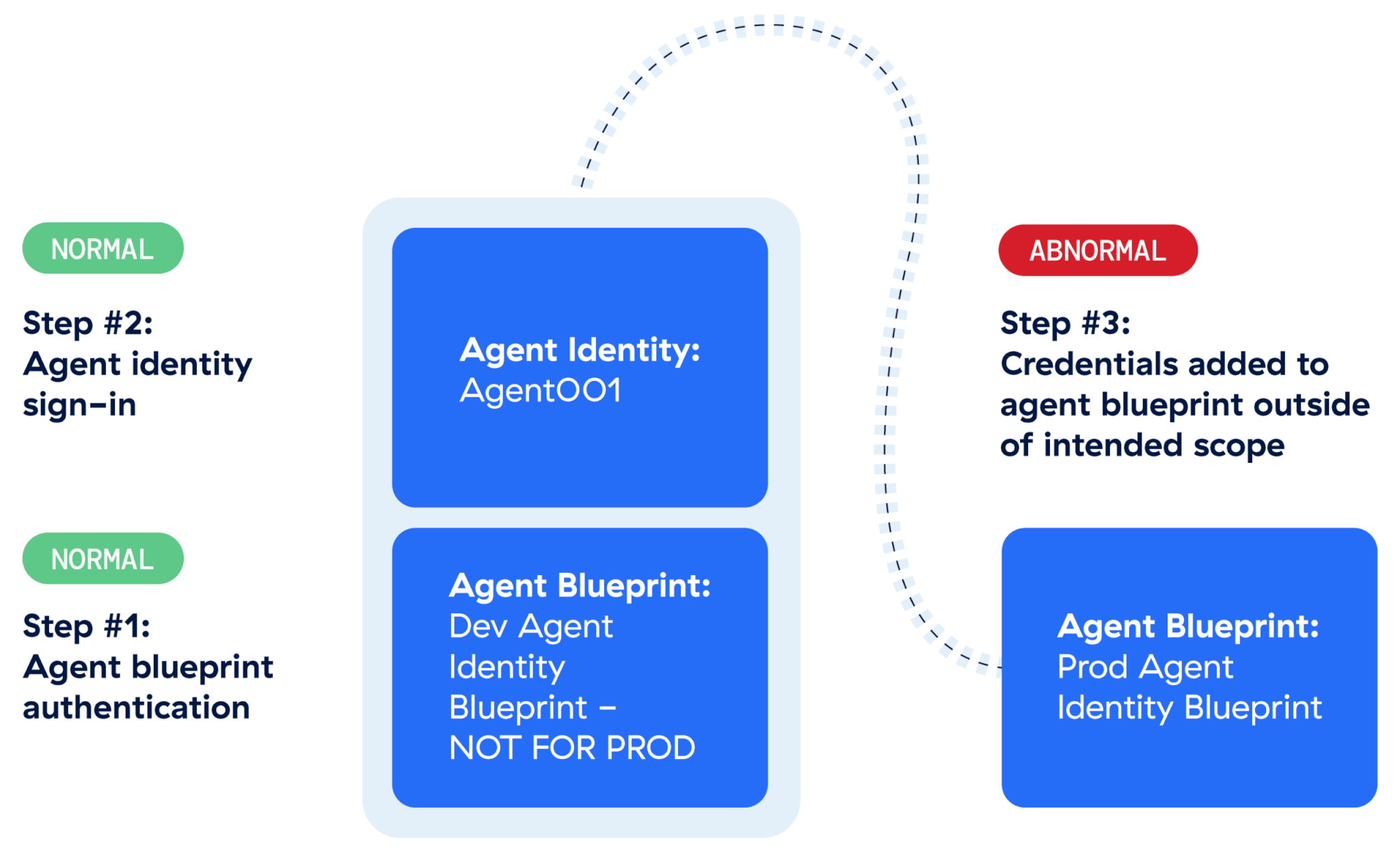
Now that we have a complete picture of the minimum viable story surrounding the client secret addition by an agent identity, we should have enough information to form and answer the following questions:
- What is the expected behavior of the agent identity (Agent001)? What is its purpose? Contact the assigned agent identity sponsor/owner.
- When/who assigned the
AgentIdentityBlueprint.AddRemoveCreds.Allapp role? Search forAuditLogsevents whereOperationName == Add app role assignment to service principal. Was there a business justification for the assignment of a potentially dangerous app role? - Were the new credentials ever used to authenticate?
KQL: AADServicePrincipalSignInLogs | where ServicePrincipalCredentialKeyId == "00a5eac9-49f9-43a1-bc7f-226cab277ae8". If there are sign-in events, retrieve any subsequent, related agent identity sign-in events and identify what actions occurred viaMicrosoftGraphActivityLogsevents. - Is the IP expected for the agent identity? There shouldn’t be a lot of variation for an agent identity compared to human identities.
- Is the user-agent string expected? There shouldn’t be a lot of variation for an agent identity compared to user identities.
- How was the agent identity influenced to perform this action? Prompt injection, agent identity owner compromise, agent identity blueprint client secret theft?
Remediation
If you determine that this was a malicious event, remediation needs to occur. Fortunately, the above logs supply all the information needed to either manually or automatically remediate.
1. Remove the client secret that was added to the agent blueprint ID.
Example remediation command:
Remove-MgBetaApplicationPassword -ApplicationId 63c8d87c-59b3-4531-874c-ca7afb477c24 -KeyId 00a5eac9-49f9-43a1-bc7f-226cab277ae8Field derivation
| Table | Field | Value |
AuditLogs | TargetResources.id | 63c8d87c-59b3-4531-874c-ca7afb477c24 |
AuditLogs | TargetResources.modifiedProperties | 00a5eac9-49f9-43a1-bc7f-226cab277ae8 |
2. Disable the suspect agent identity until remediation is complete.
Example remediation command:
Update-MgBetaServicePrincipal -ServicePrincipalId 8cd0a10f-0be8-413a-9bf2-f44bc568d1e4 -AccountEnabled:$falseField derivation
| Table | Field | Value |
AuditLogs | InitiatedBy.app.servicePrincipalId | 8cd0a10f-0be8-413a-9bf2-f44bc568d1e4 |
3. If the AgentIdentityBlueprint.AddRemoveCreds.All app role assignment remains, remove it so that it can no longer be abused.
Example remediation command:
Get-MgBetaServicePrincipalAppRoleAssignment -ServicePrincipalId 8cd0a10f-0be8-413a-9bf2-f44bc568d1e4 | Where-Object { $_.AppRoleId -eq $AppRoleToRemove.Id } | ForEach-Object { Remove-MgBetaServicePrincipalAppRoleAssignment -ServicePrincipalId 8cd0a10f-0be8-413a-9bf2-f44bc568d1e4 -AppRoleAssignmentId $_.Id }Field derivation
| Table | Field | Value |
AuditLogs | InitiatedBy.app.servicePrincipalId | 8cd0a10f-0be8-413a-9bf2-f44bc568d1e4 |
Conclusion
In order to observe, detect, investigate, and remediate agent threats in Microsoft Entra and Azure, you’ll need an understanding of the Entra Agent ID concepts as well as an understanding of the potential attack surface posed by the supported agent authentication scenarios. We also saw clearly that a single event, an AuditLogs event in this case, did not supply sufficient context.
In the scenario described, an agent identity was able to escalate privileges and persist due to it being assigned a dangerous permission. Microsoft prevents assignment of the most dangerous app roles but there are many permitted app roles that can still cause damage, AgentIdentityBlueprint.AddRemoveCreds.All certainly being one of them.
The means by which such an attack could occur in the wild could originate either from prompt injection or via a compromise of the associated owner of the agent identity or its parent blueprint principal.
In part 2 of this series, we highlight a suspicious scenario where an agent user sent a suspicious link to a human user. Can we trust our new robot overlords? We’ll continue to apply an objective approach in answering that question by digging into more event logs.
Appendix: Weaponization
The suspicious scenario highlighted in this post demonstrated an agent identity creating and adding client secret credentials to a targeted agent blueprint. How would an adversary realistically abuse such a scenario?
If an adversary can add or remove credentials to an agent principal they could perform any of the following actions:
- Create their own agent identities.
- Remove existing agent blueprint credentials, resulting in a denial of service.
- Authenticate as any agent blueprint and subsequently obtain an access token for any targeted agent identity. The following PowerShell code highlights this scenario:
$EntraTenantID = 'INSERT_TARGET_ENTRA_TENANT_ID'
$TargetBlueprintPrincipal = 'INSERT_BLUEPRINT_ID_THAT_JUST_HAD_CREDS_ADDED_TO_IT'
$ClientSecretAdded = 'INSERT_OBTAINED_CLIENT_SECRET'
$TargetAgentIdentity = 'INSERT_TARGET_AGENT_IDENTITY_ID'


# Authenticate as the agent blueprint principal
$Body = @"
client_id=$TargetBlueprintPrincipal
&client_secret=$ClientSecretAdded
&fmi_path=$TargetAgentIdentity
&grant_type=client_credentials
&scope=api://AzureADTokenExchange/.default
"@


$Arguments = @{
  Uri = "https://login.microsoftonline.com/$EntraTenantID/oauth2/v2.0/token"
  Method = 'Post'
  ContentType = 'application/x-www-form-urlencoded'
  Body = $Body
}


$Result = Invoke-WebRequest @Arguments


$Token = $Result.Content | ConvertFrom-Json


# Now get the access token for the agent identity, i.e. the token we can actually do stuff with
$Body = @"
client_id=$TargetAgentIdentity
&client_assertion_type=urn:ietf:params:oauth:client-assertion-type:jwt-bearer
&grant_type=client_credentials
&scope=https://graph.microsoft.com/.default
&client_assertion=$($Token.access_token)
"@


$Arguments = @{
  Uri = "https://login.microsoftonline.com/$EntraTenantID/oauth2/v2.0/token"
  Method = 'Post'
  ContentType = 'application/x-www-form-urlencoded'
  Body = $Body
}


$Result = Invoke-WebRequest @Arguments


$BearerToken = $Result.Content | ConvertFrom-Json
$AccessToken = ConvertTo-SecureString -String $BearerToken.access_token -AsPlainText -Force


Connect-MgGraph -AccessToken $AccessToken
# View the app roles that were granted to the target agent identity
(Get-MgContext).Scopes


# Now, this is where you'd perform your actions based on the app roles assigned to the targeted agent identity.


Disconnect-MgGraph
Related Articles
Train, triage, repeat: The AI agent changing how we fight phishing
The dual-use dilemma: Rethinking detection for remote access tool abuse
The dual-use dilemma: Rethinking detection for remote access tool abuse
Investigating suspicious AI workflows in Microsoft Entra Agent ID: Assistive agents